How TestInspector Tests Rich Text Editor and WYSIWYG Input Flows: Content Mutation Assertions, Toolbar Interactions, and Format State Validation Without Code
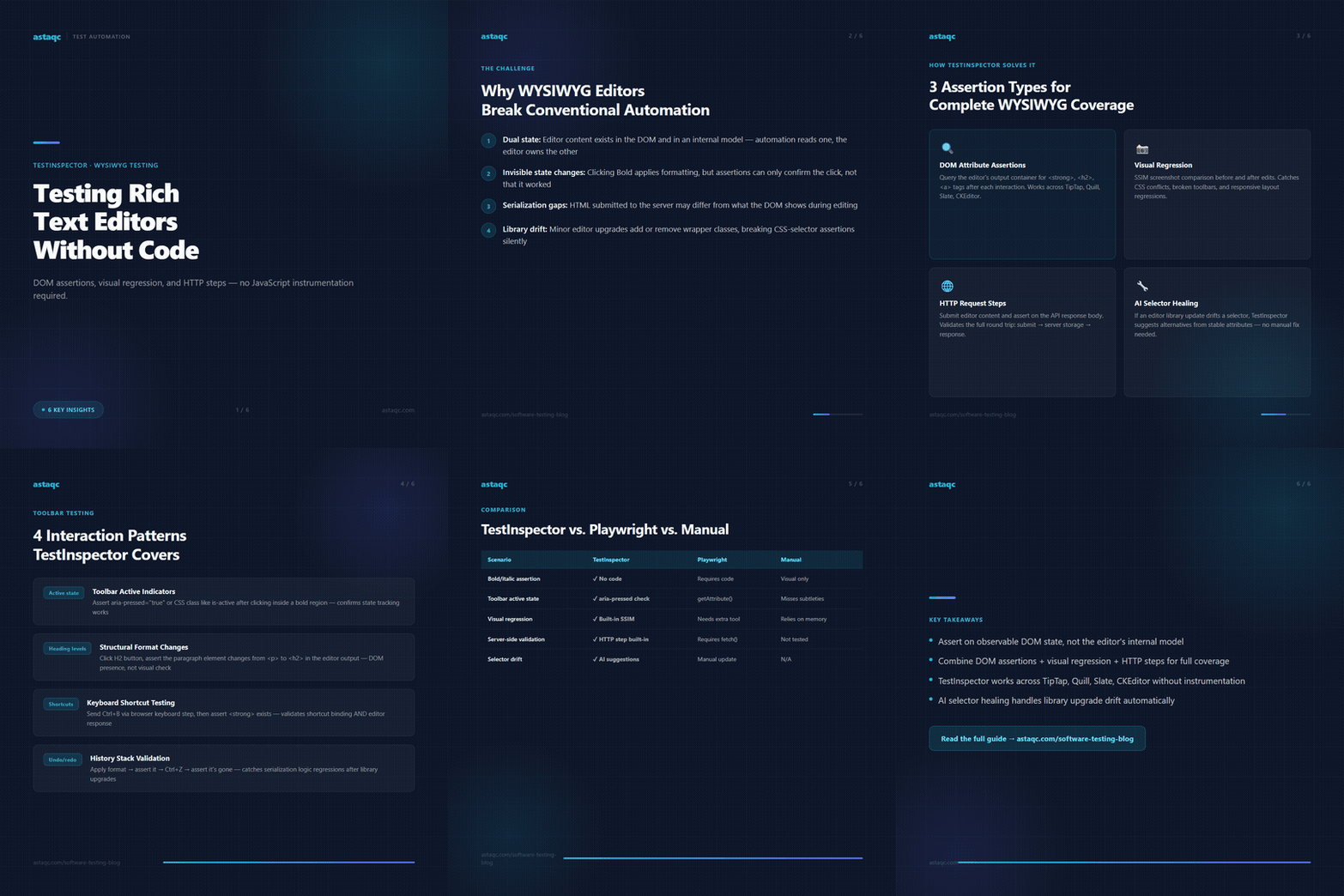
TestInspector tests rich text editor and WYSIWYG input flows through a combination of DOM state assertions on the editor's output container, HTTP step chaining for server-side content validation, and visual regression comparison between baseline and post-edit screenshots. Because TestInspector runs tests through a real browser using Selenium on Chrome, Firefox, Edge, and Safari, it interacts with contenteditable elements and toolbar buttons the same way a user would — clicking, typing, and reading DOM attribute states — without requiring direct access to the editor's internal JavaScript model. This approach works across all major rich text editor libraries, including TipTap, ProseMirror, Quill, Slate, and CKEditor, without framework-specific instrumentation.
Why Rich Text Editors Are Hard to Test with Conventional Automation
Rich text editors present a testing challenge that conventional automation tools handle poorly because the editor's content state exists in two places simultaneously: the DOM, where the rendered HTML is visible to assertions, and the editor's internal model, where formatting metadata, cursor positions, and undo history live. Most test automation frameworks that interact with contenteditable elements do so through simulated keyboard events and mouse clicks, but reading the editor's current state — whether a selection is bold, whether a paragraph is formatted as a heading, whether a link has been correctly inserted — requires either querying DOM attributes or inspecting the editor's JavaScript API. Neither approach integrates naturally into a no-code test framework.
The practical consequences of this gap are consistent across teams using WYSIWYG editors:
- Tests that click the bold button cannot reliably assert that the selected text became bold — they can only assert that the button was clicked
- Tests that type content into a contenteditable container cannot assert that the content was stored in the editor's format, only that the DOM contains certain text
- Visual state changes — a toolbar button showing as active when a formatted region is selected — are difficult to assert without reading the button's CSS class or aria-pressed attribute
- Content submitted from the editor to the server arrives as an HTML string whose structure depends on the editor library's serialization, which may differ from what the DOM contains during editing
TestInspector addresses all four of these by anchoring assertions to observable DOM state rather than internal editor state. The editor's rendered HTML output is always visible in the DOM; the toolbar button's active state is reflected in aria attributes and CSS classes; and the submitted content can be validated through an HTTP step that checks what the server received. This keeps the test logic in the observable layer, which is the layer that matters for user behavior — the editor works correctly if the DOM reflects the correct state, not if the internal model reflects it.
For teams building knowledge base software, CMS platforms, or communication tools where WYSIWYG editors are central to the user experience, investing in solid editor test coverage is part of the broader software testing strategy rather than an edge case.
How TestInspector Validates Editor Content State Without Instrumenting JavaScript
TestInspector's approach to WYSIWYG content validation uses three assertion types in combination: DOM attribute assertions on the editor container's inner HTML, visual regression screenshots that compare the rendered editor state before and after user interactions, and HTTP request steps that validate the content the server receives after a form submission or API call.
The DOM attribute assertion is the foundation. After typing content into the editor or clicking a toolbar button, a TestInspector step asserts on a specific CSS selector within the editor container. For example, to validate that a bold format was applied, the step queries the editor's output container for a <strong> or <b> element and asserts that it exists and contains the expected text. For link insertion, the step queries for an <a> tag and asserts on its href attribute. These assertions work because every standard rich text editor — regardless of its internal model — produces standard HTML elements in the DOM when formatting is applied.
TestInspector's self-healing selector mechanism is particularly valuable for editor tests because editor libraries frequently add and remove wrapper classes and data attributes in minor versions. If a selector drifts because the editor library was updated, TestInspector's AI selector suggestions propose alternatives based on the element's remaining stable attributes — its tag name, its position relative to parent elements, or the text content it contains — rather than failing the test run entirely and requiring manual investigation.
The visual regression component compares screenshots of the editor's rendered output before and after an edit action. This catches a category of formatting regressions that DOM assertions miss: cases where the HTML structure is correct but the visual rendering is broken due to a CSS conflict, a theme change, or a responsive layout issue that collapses the toolbar on certain viewport sizes. TestInspector's SSIM-based screenshot comparison with adjustable sensitivity thresholds and the ability to define crop and exclusion regions lets teams exclude the blinking cursor and other expected animated elements from the comparison baseline.
For server-side validation, an HTTP request step in TestInspector can submit the editor's content through the form action and assert on the API response body. This validates the full round trip: that the editor's submit button triggers the correct API call, that the server receives the HTML content in the expected format, and that the response confirms successful storage. Teams using TestInspector for test automation across content management workflows typically combine all three assertion types in a single test suite: DOM assertions for inline formatting, visual regression for layout fidelity, and HTTP steps for backend integration.
Toolbar Interaction Testing: Format State, Active Button Assertions, and Keyboard Shortcuts
Toolbar interactions are the most user-visible part of a rich text editor and also the part most likely to regress silently. A toolbar button that stops responding to clicks, a formatting command that applies the wrong semantic element, or an active state indicator that fails to update when a formatted region is selected are all bugs that users encounter immediately but that test suites built around form field assertions miss entirely. TestInspector tests toolbar interactions through the same DOM-driven approach it uses for content assertions: clicking toolbar elements through real browser events, then asserting on the resulting state through attribute checks.
Active state assertions: When a user places their cursor inside a bold region in a well-implemented rich text editor, the bold button in the toolbar should reflect the active state — typically through an aria-pressed="true" attribute or a CSS class like is-active or ql-active. TestInspector asserts on these attribute values after positioning the cursor inside a formatted region, confirming that the editor's toolbar state tracking is working correctly. This catches the common regression where a formatting option is applied correctly but the toolbar state indicator stops updating after a library upgrade.
Heading level validation: For editors that support heading formatting (H1, H2, H3), a TestInspector test sequence places the cursor in a paragraph, clicks the heading dropdown or the H2 button, and then asserts that the paragraph's containing element has changed from <p> to <h2> in the editor's output container. The assertion uses a DOM presence check rather than a text content check, confirming the structural change rather than just the visual appearance.
Keyboard shortcut testing: Common keyboard shortcuts (Ctrl+B for bold, Ctrl+K for link insertion) are testable through TestInspector's browser step that sends keyboard events to a focused element. After sending the shortcut, the same DOM assertion step confirms that the formatting was applied. This validates both the shortcut binding and the editor's response to programmatic key events, which can differ from the response to toolbar button clicks in editors that handle keyboard input through separate code paths.
Undo and redo: Testing Ctrl+Z after a formatting operation and asserting that the formatting was removed validates the editor's history stack, which is a common failure point after serialization logic changes. TestInspector's step sequencing makes this straightforward: apply formatting, assert the formatted state, send Ctrl+Z, assert that the formatting is gone.
See TestInspector for a full walkthrough of how keyboard event steps are configured for specific editor interaction patterns. For teams transitioning from manual toolbar testing to automated coverage, the software testing guide provides context on where editor testing fits in a broader quality strategy.
WYSIWYG Editor Testing Approaches: TestInspector vs. Playwright vs. Manual
Teams evaluating their WYSIWYG test coverage options typically compare no-code tools, code-first automation frameworks, and manual testing. The comparison below reflects the practical tradeoffs for editor-specific test scenarios in production applications.
| Test Scenario | TestInspector | Playwright | Manual Testing |
|---|---|---|---|
| Bold/italic formatting assertion | DOM assertion step, no code required | page.locator + getAttribute, requires code | Visual check only, not repeatable |
| Toolbar active state | Attribute assertion on aria-pressed / CSS class | getAttribute check in test code | Visual check, misses subtle regressions |
| Visual rendering regression | Built-in SSIM comparison with exclusion regions | Requires separate visual testing tool | Relies on tester noticing differences |
| Server-side content validation | HTTP request step with response body assertion | fetch() or API client in test code | Not tested, requires separate DB check |
| Selector drift recovery | AI selector suggestions on failure | Manual update required | Not applicable |
| Keyboard shortcut testing | Keyboard event step plus DOM assertion | keyboard.press() plus locator assertion | Time-intensive, error-prone |
| Cross-browser coverage | Chrome, Firefox, Edge, Safari per run | Supported, requires CI matrix setup | Impractical to cover all browsers manually |
The key practical difference is the feedback loop. TestInspector runs editor tests in the same no-code environment as the rest of the product's test suite, so teams do not need separate tooling or separate expertise to maintain editor coverage. Playwright gives QA engineers with coding skills precise control over editor internals but requires maintaining test code as the editor library evolves. Manual testing catches obvious regressions but misses subtle formatting changes, attribute drift, and cross-browser serialization differences.
Frequently Asked Questions
Can TestInspector test editor libraries that use Shadow DOM internally?
Some rich text editor libraries, particularly those built on web components, place parts of their DOM inside a shadow root. TestInspector's browser automation operates at the same level as Selenium WebDriver, which has native support for shadow DOM piercing on modern Chrome and Edge builds. For editors where the contenteditable element is accessible through the shadow root's public interface, TestInspector's DOM assertions work without modification. For deeply nested shadow DOM structures, the workaround is to assert on the editor's visible output container, which typically sits outside the shadow root, rather than on its internal implementation elements.
How does TestInspector handle editors that serialize content to Markdown instead of HTML?
When a rich text editor stores content as Markdown rather than HTML — which is common in developer-focused tools — the DOM assertion approach adapts by asserting on the editor's input field value rather than on a rendered HTML container. After an edit action, TestInspector reads the textarea or hidden input that holds the Markdown string and asserts that it contains the expected Markdown syntax. The HTTP step validation approach works identically regardless of serialization format: the step asserts on what the server receives, not on what format the editor uses internally.
What is the best way to test editor content that includes embedded images or file uploads?
TestInspector tests image embedding in two steps: first, an HTTP request step that uploads the image file and captures the returned CDN URL; second, a DOM assertion step that confirms the editor's output container includes an img element with the src attribute matching the returned URL. This validates the full flow — file upload, URL insertion, and editor rendering — without depending on the editor's internal image handling code.
How does visual regression work for editors that have animated transitions or blinking cursors?
TestInspector's visual regression uses exclusion regions and crop selectors to remove unstable areas from the comparison baseline. The blinking cursor is excluded by defining a narrow exclusion region around the cursor position, or by taking the baseline screenshot after moving the cursor to a stable position outside the main content area. For animated toolbar transitions, the baseline screenshot is taken after the animation completes by using TestInspector's wait step to pause after the trigger action before capturing the screenshot.
Can TestInspector validate that a rich text editor preserves formatting after a page reload?
Yes. TestInspector supports multi-step test flows where the sequence includes: creating content with formatting, submitting the form or triggering an auto-save API call, refreshing the page, and asserting that the editor container loads with the same formatted HTML. This validates the full persistence layer — that the server accepted the formatted content, stored it correctly, and re-served it in a form the editor can render identically.
What accessibility assertions does TestInspector provide for WYSIWYG editors?
TestInspector includes axe-core-based accessibility assertions at configurable severity levels. For rich text editors, the most relevant assertions cover the editor container's role and aria-label attributes, the toolbar buttons' aria-label and aria-pressed state, and the semantic structure of the editor's output HTML. For teams evaluating TestInspector for content management applications, the manual testing team at Astaqc can benchmark your current WYSIWYG coverage. See hire a QA team for engagement options, and the complete software testing guide for context on where editor testing fits in a broader quality program.
Rich text editors store formatting state in an internal model that conventional automation tools cannot read directly. TestInspector tests them by asserting on observable DOM state — the same HTML elements and attributes a user's browser renders — rather than on the editor's internal representation.

Astaqc Team
November 27, 2026