How TestInspector Tests Multi-Step AI Agent Workflows: HTTP Assertions, State Validation, and Non-Deterministic Output Handling Without Writing Code
TestInspector tests multi-step AI agent workflows through its HTTP request steps, which send requests to agent API endpoints and assert on status codes, response body fields, and JSON schema structure without requiring any code. Because AI agent outputs are non-deterministic, TestInspector assertions focus on structural correctness rather than exact text match — checking that a required field exists, that a status code is 200, or that a JSON payload contains a specific key with a non-null value. Variable interpolation then passes extracted response values into the next step, creating a chained test sequence that mirrors the actual agent execution path.
Why AI Agent Workflows Require a Different Testing Approach
Standard UI or API tests assume that the same input produces the same output every time. AI agent workflows break this assumption at every layer. The agent's reasoning, its tool selection, and the phrasing of its response all vary between runs, even when the underlying task is identical. Testing strategies that rely on hard-coded expected values fail in this environment — not because the system is broken, but because natural language output is inherently variable.
The more reliable approach focuses on the boundaries between components: the HTTP requests the agent sends to external tools, the status codes those tools return, the structure of the agent's response payload, and the state changes that the workflow is supposed to produce. These properties are deterministic or structurally constrained even when the agent's reasoning is not, which makes them stable test targets.
AI agent workflows also introduce cascading failure modes that do not exist in simple API testing. If the first step in a chain produces a malformed response — a missing session token, an unexpected response schema, or a timeout — every subsequent step fails, but the error appears at the end of the chain rather than at the step that caused it. Tracing failures back to their origin requires test visibility at each step boundary, not just at the final outcome.
| Testing Dimension | Standard API Test | AI Agent Workflow Test |
|---|---|---|
| Expected output | Fixed string or exact JSON match | Structural or schema assertion |
| Step dependency | Stateless or simple chaining | Variable chaining across multiple agent API calls |
| Non-determinism | None expected | Expected — test must tolerate variation |
| Failure mode | Wrong response value | Missing field, wrong status code, dropped step in chain |
| Run frequency | On every CI commit | Every CI commit plus scheduled production smoke runs |
Teams building AI-native features — search agents, code generation pipelines, or autonomous task runners — benefit from treating each inter-agent HTTP call as an integration boundary that needs its own assertion. For a broader overview of how AI is changing testing practices, the AI in software testing guide for 2025 provides context on tool selection and coverage strategy across different AI system types.
How TestInspector HTTP Steps Target Agent API Endpoints
TestInspector's HTTP request steps support all standard methods — GET, POST, PUT, PATCH, DELETE — with configurable headers, request bodies, and authentication tokens. For AI agent workflows, the most common pattern is a POST request to an agent run endpoint, with a JSON body containing the task description, session context, or input parameters, followed by assertions on the response status code and body structure.
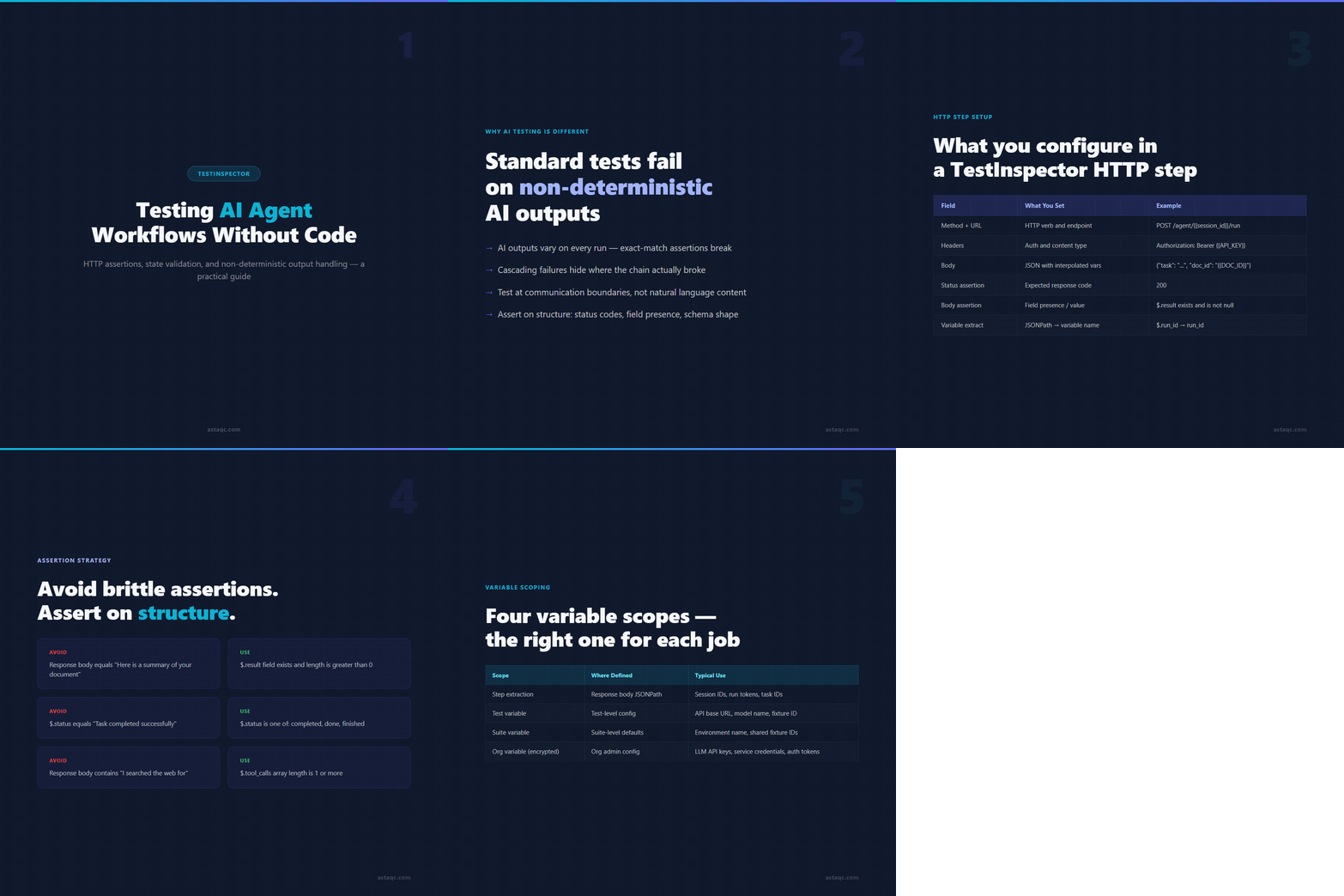
Setting up an HTTP step in TestInspector requires no code. You specify the method and URL in the step editor, add headers (such as Authorization: Bearer {{API_TOKEN}} using TestInspector's variable interpolation), define the request body as a JSON template, and configure the assertions you want to check. TestInspector supports status code assertions (exact value, range, or not-equal), response body field assertions (field exists, field equals value, field is not null), and JSON path assertions for navigating nested response structures.
For multi-step agent workflows, the variable extraction feature is what makes the test chain possible. After an HTTP step receives a response, you can configure TestInspector to extract a specific field — such as a session ID, task ID, or run token returned by the agent API — and store it in a variable. That variable is then available to subsequent steps via {{variable_name}} syntax, allowing each step to operate on the actual state produced by the previous step rather than on a hard-coded test fixture.
| Step Configuration Field | What You Set | Example for AI Agent API |
|---|---|---|
| Method | HTTP verb | POST |
| URL | Endpoint with optional path variables | https://api.example.com/agent/{{session_id}}/run |
| Headers | Key-value pairs including auth tokens | Authorization: Bearer {{AGENT_API_KEY}} |
| Request body | JSON payload with interpolated variables | {"task": "summarize document", "doc_id": "{{DOC_ID}}"} |
| Status assertion | Expected HTTP status code | 200 |
| Body assertion | Field presence or value check | $.result field exists and is not null |
| Variable extraction | JSONPath to variable name | $.run_id extracted to run_id |
This setup covers the most common AI agent integration pattern: start a run, verify it was accepted (status 200), extract the run ID, poll for completion using the run ID in the next step, and assert that the final result field is populated. All of this is configured through the TestInspector interface without writing assertion code, which is especially useful for teams using test automation services that need coverage across both traditional UI flows and newer AI-backed API endpoints in the same test suite.
Asserting Non-Deterministic AI Outputs Without Hard-Coding Expected Values
The most common mistake in AI workflow testing is asserting on the exact text of an AI-generated response. This produces brittle tests that fail not because the system broke, but because the model phrased an answer differently on two consecutive runs. The correct approach distinguishes between structural assertions (which properties must exist and what format they must be in) and content assertions (what the text should say), and applies only the structural ones in automated tests.
TestInspector's assertion system is well-suited to this approach. For an AI agent that returns a JSON response, you assert that the response status is 200, that the top-level result field exists and is not null, and that any required nested fields (such as summary, sources, or confidence_score) are present. If the agent is supposed to call a specific tool, you assert that the tool_calls array has at least one entry. If the agent is supposed to signal completion, you assert that the status field equals one of a set of accepted values rather than one specific string.
Partial text match assertions — checking that a response body contains a specific substring — are acceptable for validating that the agent addressed the core topic, but they should be anchored to factual terms that the system is contractually required to include (a product name, a code identifier, a required legal disclosure) rather than to natural language phrases that may vary. The goal is to test that the system behaved correctly, not that the model produced identical phrasing.
| Output Type | Brittle Assertion (Avoid) | Structural Assertion (Use) |
|---|---|---|
| Agent text response | Response body equals "Here is a summary of your document" | $.result field exists and length is greater than 0 |
| Task completion status | $.status equals "Task completed successfully" | $.status is one of: completed, done, finished |
| Tool call evidence | Response body contains "I searched the web for" | $.tool_calls array length is 1 or more |
| Error absence | Response body does not contain "error" | $.error field is null or absent |
| Response latency | Response time under 500ms (unrealistic for LLM) | Status 200 within configurable step timeout |
This approach produces test suites that catch real regressions — an agent that stops calling the right tools, a workflow that starts returning incomplete response structures, or a downstream API that begins returning errors — without failing on normal output variation. For teams running performance testing alongside functional AI testing, the same HTTP step infrastructure can measure response latency as a secondary assertion while structural correctness remains the primary gate.
Managing Test State Across Multi-Step AI Agent Sequences
AI agent workflows typically involve a sequence of calls where later steps depend on data produced by earlier ones. A session creation step returns a session ID; a task submission step uses that session ID to target the right agent context; a results polling step uses the task ID returned by the submission; a cleanup step uses the session ID to terminate the session. Each variable must flow correctly from step to step or the entire sequence fails at the wrong point for the wrong reason.
TestInspector manages this through its variable scoping system. Variables extracted from an HTTP response are available within the test that defined them. Test-level variables — such as a reusable API base URL or a default model name — are defined once and available across all steps in that test. Suite-level variables are shared across all tests in the suite, which is useful for parameters like an environment name or a base document ID that multiple tests in the same run need to reference consistently.
For sensitive values — API keys, auth tokens, service account credentials — TestInspector provides encrypted variable storage at the org level. These are defined once by an org admin, stored encrypted, and referenced in any test within the org using the standard {{VARIABLE_NAME}} syntax. The token is never visible in the test definition or in run logs, which matters for teams running AI workflow tests that call external LLM providers with billable API keys.
| Variable Scope | Where Defined | Available In | Typical Use |
|---|---|---|---|
| Step extraction | Response body JSONPath | Subsequent steps in the same test | Session IDs, run tokens, task IDs |
| Test variable | Test-level configuration | All steps in that test | API base URL, model name, test document ID |
| Suite variable | Suite-level defaults | All tests in the suite | Environment name, shared fixture IDs |
| Org variable (encrypted) | Org admin configuration | All suites and tests in the org | LLM API keys, service credentials, auth tokens |
TestInspector also supports the {{TIMESTAMP}} and {{ALPHANUMERIC}} variables for generating unique identifiers in test payloads. This is useful when creating agent sessions or document upload requests that require a unique request ID per run, preventing state collision between test runs scheduled across the same test environment. For teams with dedicated QA engineers building coverage for AI-backed systems, this variable hierarchy removes most of the complexity that would otherwise require custom test framework scaffolding. For the broader context of how AI testing fits into a modern quality strategy, the AI in software testing guide covers the selection criteria and risk tradeoffs in detail. TestInspector also provides a CI/CD trigger API so these agent workflow tests run on every deployment automatically — learn more at TestInspector.
Frequently Asked Questions About Testing AI Agent Workflows with TestInspector
What is the difference between testing an AI agent and testing a standard API?
Standard API tests assert on exact response values because the same input always produces the same output. AI agent tests assert on structural properties — field presence, status codes, schema correctness — because the agent's natural language output varies between runs. The underlying HTTP communication is testable with the same tools; the assertion strategy is what changes.
Can TestInspector test LLM responses that change each run?
Yes. TestInspector assertions check structural properties of the response rather than exact text content. You assert that the response status is 200, that required fields exist and are non-null, and that the response schema matches the expected structure. The natural language content of the AI's answer is not compared, so normal variation between runs does not cause false failures.
How do you validate that an AI agent completed its task correctly?
The most reliable approach is to assert on the downstream state the agent was supposed to change, not on the agent's self-reported completion status. If the agent was supposed to write a file, assert that the file exists in storage. If it was supposed to update a record, make an HTTP step to fetch that record and assert on its updated value. TestInspector's variable chaining makes it straightforward to build these downstream verification steps into the same test sequence.
How does TestInspector compare to custom test scripts for AI workflow testing?
Custom test scripts give engineers more flexibility for complex assertion logic, but they add framework maintenance overhead and require coding skills to write and update. TestInspector covers the most common AI workflow test patterns — HTTP requests, response assertions, variable extraction, chaining — without any code, and its self-healing selector suggestions reduce the maintenance cost as endpoints evolve. For the HTTP layer of AI agent testing, TestInspector replaces most of the custom scaffolding that teams otherwise build from scratch.
Can TestInspector run AI workflow tests on a schedule for production monitoring?
Yes. TestInspector supports scheduled test runs via cron syntax, interval triggers, and one-time scheduling. Teams use this to run smoke tests against production agent endpoints at regular intervals — verifying that the agent API is accepting requests, responding within latency thresholds, and returning structurally correct responses — independent of CI/CD deployments. For more information on setting up scheduled runs and monitoring patterns in production environments, see the test automation services overview.
The correct approach to AI workflow testing focuses on communication boundaries between agents — not on natural language outputs. Assert on structure, status codes, and field presence, and you get reliable coverage even when AI outputs change on every run.

Avanish Pandey
November 13, 2026