How TestInspector Tests Copy-to-Clipboard and Share Functionality: Clipboard API Assertions, Deep Link Validation, and Native Share Dialog Testing Without Code
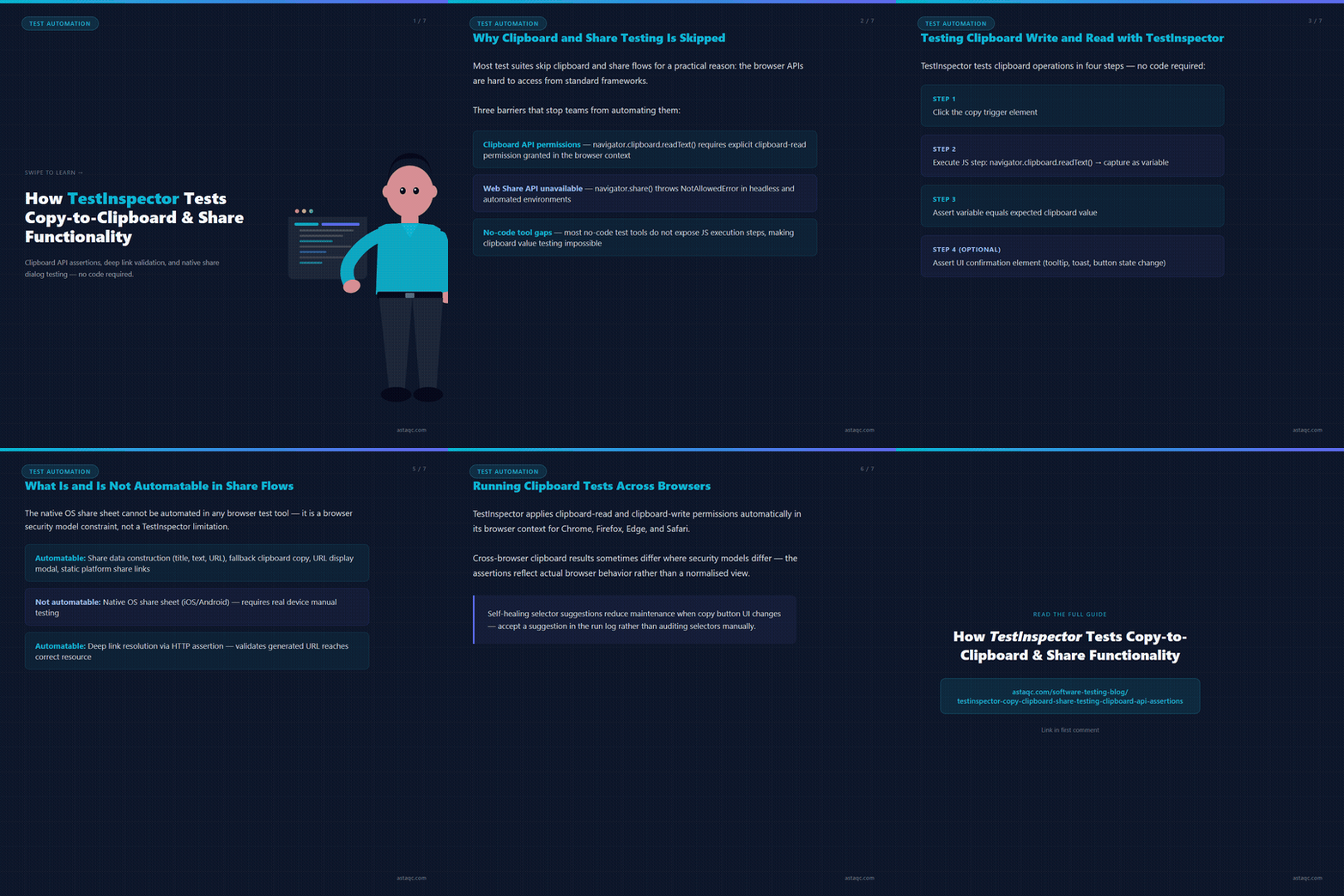
TestInspector tests copy-to-clipboard and share functionality through DOM state assertions, JavaScript execution steps, and HTTP request steps — without writing code. When a user copies a value, TestInspector reads the clipboard via a JavaScript step and asserts the extracted string matches the expected content. When a user shares a link, TestInspector captures the generated URL as a variable and validates it with an HTTP assertion step. Both flows are built in TestInspector’s AI chat interface as structured steps, then run in CI without manual permission setup or framework configuration.
Copy-to-clipboard and share tests are absent from most automated test suites for a practical reason: the browser APIs involved are difficult to access from standard test frameworks. The Clipboard API requires explicit clipboard-read and clipboard-write permission grants in the browser context. The Web Share API is unavailable in headless environments entirely. These barriers are not insurmountable, but they require setup that most teams skip when balancing sprint velocity against test coverage depth. The result is that clipboard and share flows reach production without automated regression coverage, which is where most share-link generation bugs and clipboard content errors first surface.
This guide covers the full scope of what can and cannot be automated in clipboard and share flows, how TestInspector models each step, and how deep link validation works across redirect chains and expiring URLs. For teams building comprehensive UI test coverage, Astaqc’s test automation services include specialist coverage for browser API test patterns. Teams switching from Playwright or Selenium to no-code testing can review TestInspector for how AI-native test generation handles clipboard and share flows without manual permission configuration.
Why Clipboard and Share Testing Is Skipped in Most Test Suites
The setup cost for clipboard testing in Playwright requires three additions to the test configuration: granting the clipboard-read and clipboard-write permissions in the browser launch options, writing a JavaScript evaluation step to call navigator.clipboard.readText() and capture the result, and handling cross-browser differences where Firefox and Safari have stricter permission models than Chrome. For teams using Selenium, the equivalent setup involves JavaScript executor calls and browser-specific capability settings. For teams using no-code tools that do not expose JavaScript execution steps, clipboard value testing is not possible at all.
The Web Share API presents a different barrier. navigator.share() throws a NotAllowedError in headless and automated browser contexts because it requires a secure browsing context and a user gesture activation — conditions that automated test environments cannot satisfy. Applications that implement the Web Share API typically provide a fallback for desktop or non-supporting browsers: a clipboard copy action, a URL display modal, or static platform share links. The fallback is fully testable. The native share sheet is not.
| Testing Approach | What It Covers | What It Misses |
|---|---|---|
| Direct Clipboard API assertion | Exact clipboard value after copy action | Cross-browser permission edge cases |
| Visual confirmation assertion | UI feedback element (tooltip, toast, button state change) | Actual clipboard content |
| HTTP deep link validation | Generated link resolves to correct resource | On-device share sheet behavior |
| Web Share API fallback test | Fallback element appearance and function | Native share dialog content and recipient selection |
Testing Clipboard Write and Read Operations with TestInspector
TestInspector tests clipboard write operations by clicking the copy trigger element, executing a JavaScript step to call navigator.clipboard.readText(), capturing the returned value as a test variable, and asserting that variable against the expected string. This sequence maps directly to the user journey: trigger the copy, check that the right content landed in the clipboard. The AI chat interface in TestInspector generates these steps from a natural language description of the copy flow — specifying the button, the expected value, and the page context is sufficient to produce the full structured test without manual step construction.
The practical constraint is browser permission. Chrome and Firefox require a clipboard-read permission grant before navigator.clipboard.readText() can execute. TestInspector applies the clipboard-read and clipboard-write permissions automatically in its browser context configuration for Chrome, Firefox, Edge, and Safari, so no separate permission step appears in the test flow. Cross-browser clipboard tests run with a single test definition rather than separate configurations per browser, though the results may differ where browser security models differ.
Visual confirmation testing complements clipboard value testing for applications that show UI feedback after a copy. When a copy button changes text from “Copy” to “Copied”, a tooltip appears, or a toast notification is displayed, those state changes can be asserted independently of the clipboard value — and in some applications, the visual confirmation is the only observable outcome because the clipboard write happens client-side without an accessible API endpoint. TestInspector’s DOM state assertions check element visibility, text content, and CSS class changes, covering the full range of copy confirmation patterns without additional test code. See the complete software testing guide for how assertion design principles apply to both API-level and UI-level copy validation.
TestInspector’s self-healing automation helps with clipboard test maintenance because copy buttons and confirmation elements change frequently during UI redesigns. AI selector suggestions log alternative selectors when a step fails because the target element moved or was renamed. For clipboard tests targeting small buttons and tooltip elements with simple, non-unique selectors, the self-healing behavior reduces maintenance from a manual selector audit to accepting a suggestion in the run log.
Deep Link Validation: Testing Generated URLs and Share Targets
Share links — URLs generated for a specific resource, often containing embedded identifiers, tokens, or parameters — are testable as HTTP assertions regardless of the sharing mechanism. The test pattern is: trigger the copy or share action, extract the URL from the clipboard or the display element, issue an HTTP GET request to the extracted URL using TestInspector’s HTTP request step, and assert on the response status code and the response body content that confirms the link resolves to the expected resource.
TestInspector’s variable interpolation handles the dynamic portions of share URLs. A share link typically includes a resource ID or session token that changes between test runs. The {{VAR}} syntax captures the dynamic portion from the clipboard or DOM element, stores it as a test variable, and uses it in the subsequent HTTP assertion. The test validates the actual runtime-generated link rather than a hardcoded example URL that may not reflect current generation logic. The {{TIMESTAMP}} variable supports expiration testing by capturing the generation time for comparison against the expiration window.
Link expiration testing uses TestInspector’s scheduling capability. A share link that expires after 24 hours can be tested in two scheduled runs: immediately after generation to assert a 200 status, and again after the expiration window to assert a 404 or redirect to an expiration page. This pattern is not easily achievable in a standard Playwright or Selenium test because it requires coordination across test runs. TestInspector’s one-time trigger scheduling supports the deferred assertion step as a natural part of the test flow without custom orchestration code.
Redirect chains in share URLs are a common deep link defect that HTTP assertion catches early. Marketing platforms and analytics services often wrap share links in redirect chains: the shared link goes to a tracking domain, then to a marketing URL, then to the application. If any step in the chain breaks, the share link silently fails to reach the intended resource. TestInspector’s HTTP assertion follows redirect chains by default and asserts on the final destination URL, catching broken intermediate redirects that a simple status-code test would miss. For teams managing complex URL validation requirements, Astaqc’s test automation services provide structured coverage for link validation patterns in CI pipelines.
Native Share Dialog Testing: What Is and Is Not Testable
The native share dialog — the OS-level sheet on mobile devices triggered by navigator.share() — cannot be automated in standard test environments. The Web Share API requires a user gesture in a secure browsing context, and headless or automated browsers do not satisfy this requirement. This applies to TestInspector, Playwright, Selenium, and all other browser automation tools — it is a browser security model constraint, not a tool limitation. No test automation tool can automate the native share sheet.
What is fully testable is the share data construction and the fallback behavior that most applications implement for desktop or non-supporting browsers. TestInspector tests the share data layer by asserting on the title, text, and URL values that the application constructs before calling navigator.share(). Teams that expose share data through a data attribute or a non-sensitive debug endpoint can assert on those values with DOM assertions or HTTP steps. The fallback behavior — a clipboard copy action, a URL display modal, or static platform-specific share links — is testable as a standard UI flow: click the share button in a desktop browser where navigator.share() is unavailable, assert on the fallback element appearance and content, and validate the fallback URL or clipboard value.
| Share Flow Component | Automated Test Coverage | Requires Manual or Device Testing |
|---|---|---|
| Share data construction (title, text, URL) | Full: assert all three values before API call | No |
| Fallback behavior (clipboard copy, modal, static links) | Full: assert fallback element and function | Confirm on mobile too |
| Native share sheet (OS-level) | Not possible in automated environments | Required for complete coverage |
| Deep link resolution | Full: HTTP assertion on generated URL | No |
Mobile device testing for the native share sheet is the one coverage gap that automated testing cannot close. Astaqc’s manual testing services include device-level validation for native share flows as part of mobile test coverage, complementing the automated fallback and deep link assertions that TestInspector runs in CI.
Frequently Asked Questions
Can TestInspector test clipboard operations on all browsers?
TestInspector tests clipboard operations across Chrome, Firefox, Edge, and Safari. The Clipboard API permission requirements differ between browsers: Chrome and Firefox require clipboard-read and clipboard-write permissions granted in the browser context, while Safari has stricter activation requirements tied to user gesture timing. TestInspector applies the appropriate permission configuration per browser automatically, so the clipboard assertion step runs the same way in all four browsers without separate permission steps in the test flow. Cross-browser clipboard results sometimes differ where security models differ — the assertions reflect actual browser behavior rather than a normalised view.
How does TestInspector extract the copied URL to validate it?
TestInspector uses a JavaScript execution step to call navigator.clipboard.readText() and capture the returned string as a test variable. That variable is then used in subsequent assertion steps: a string equality check confirms the copied value matches the expected URL pattern, and an HTTP request step uses the variable as the target URL to validate the link resolves correctly. The variable carries the runtime-generated URL through the test flow so the HTTP assertion operates on the actual generated link rather than a hardcoded example.
How do you test a copy-to-clipboard button that uses document.execCommand instead of the Clipboard API?
Applications using document.execCommand(‘copy’) cannot have their clipboard write read back via navigator.clipboard.readText() because execCommand does not go through the Permissions API. The practical test approach is to assert on the visual confirmation layer instead: check that the confirmation tooltip or button state change appears correctly after the copy action, and separately verify the value being passed to execCommand using a JavaScript interception step. Teams migrating from execCommand to the modern Clipboard API can add a readText() assertion as a migration verification step — if it succeeds, the migration is confirmed.
How do I test share links that generate different URLs for different user permission levels?
TestInspector’s test suite hierarchy and variable scoping support permission-sensitive share link testing. Create a suite that runs the share flow under different user contexts — a free-tier user and a paid-tier user — and assert that the generated URLs contain the appropriate parameters or access tokens for each context. Store credentials at the suite level using encrypted variable storage, keeping the contexts separate without duplicating test steps. Assert on URL structure rather than exact token values so tests do not fail when tokens rotate on a natural refresh cycle.
Can TestInspector schedule clipboard and share tests to run on a recurring basis?
TestInspector’s scheduling supports running clipboard and share tests on cron, interval, or one-time triggers, making it suitable for share link expiration testing and synthetic production monitoring. A test that generates a share link, extracts its URL, and validates its resolution against the production environment provides continuous assurance that the share infrastructure is functioning. For teams integrating these tests into a CI/CD workflow, TestInspector’s CI/CD trigger API supports both on-demand pipeline triggers and scheduled monitoring runs from the same test definition.
Clipboard and share flows reach production without automated test coverage not because teams do not want to test them, but because the standard browser API setup cost in code-first frameworks discouraged teams from prioritising them.

Astaqc Team
November 24, 2026