October 2, 2026
Feature Flag Testing in 2026: How to Validate Configuration Changes, Progressive Rollouts, and Environment-Specific Behavior Without Breaking Production
Feature flag testing validates that flag-gated behavior works correctly for every combination of flag state, user segment, and environment — and that the application behaves correctly when flags are changed at runtime without a deployment. It is a distinct testing discipline from standard functional testing: a feature flag introduces branching execution paths that must each be tested independently, and the flag evaluation logic itself must be validated to ensure users in the correct cohort receive the intended experience. Teams that test the happy path with flags enabled but not the fallback path with flags disabled are shipping untested code to every user who receives the off state.
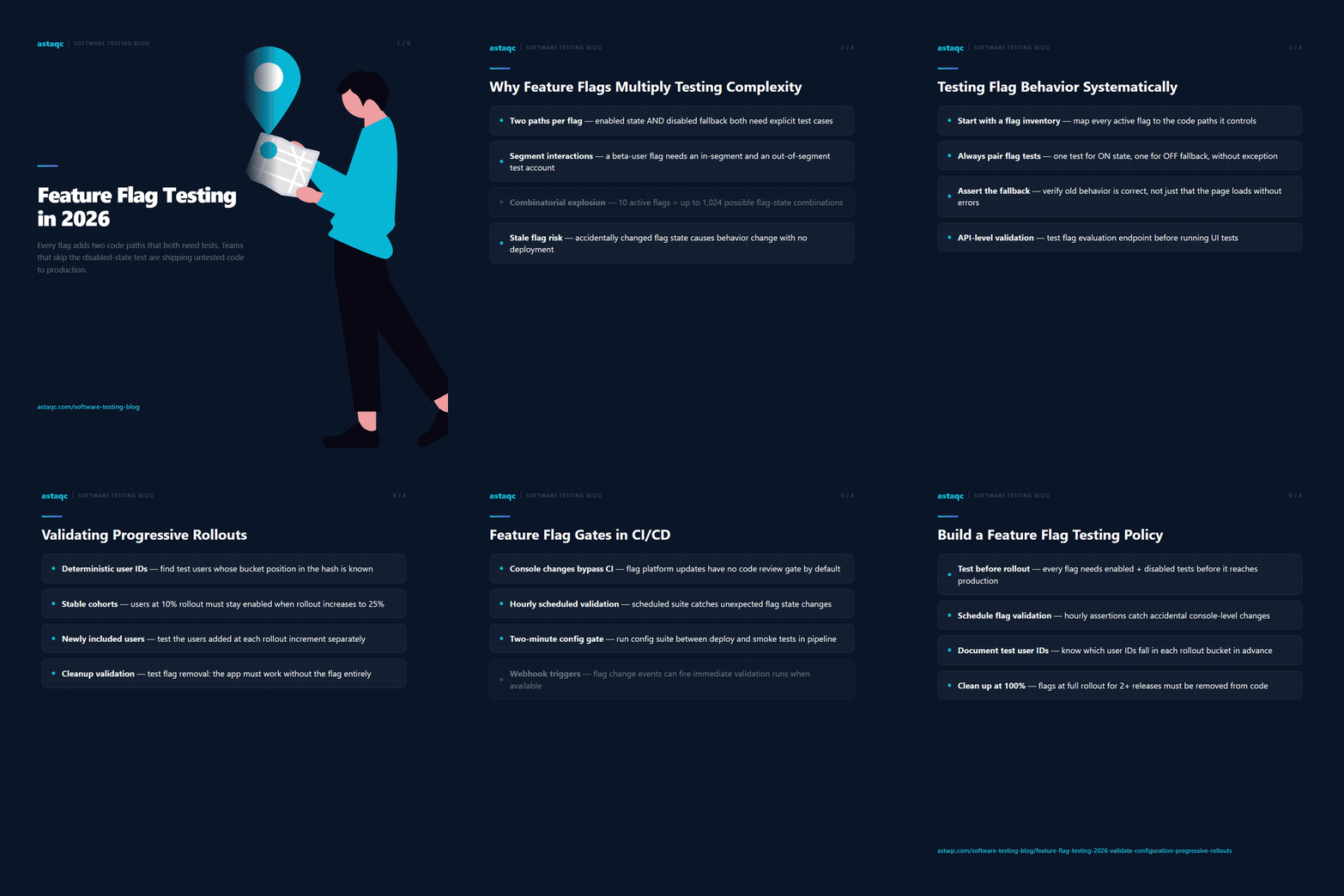
The scale of the testing surface is larger than most teams initially estimate. A single boolean feature flag adds two paths to every test case that touches the flagged feature. A flag with percentage-based targeting adds user-segment-specific behavior. A flag with environment overrides — enabled in staging for QA, disabled in production until release — adds environment-specific assertions. When multiple flags interact, the combinations multiply: two flags with two states each create four possible configurations. An application with ten active flags has up to 1,024 possible flag-state combinations, though in practice only a subset of those combinations is meaningful and needs explicit testing.
Teams looking for foundational context on test strategy can review Astaqc’s software testing services and the complete software testing guide. This article covers how to structure feature flag tests, how to validate progressive rollouts, and how to integrate flag validation into CI/CD pipelines.
The surface of a feature flag test is not just “does the feature work when the flag is on.” It includes: does the feature work correctly when the flag is on; does the application degrade gracefully when the flag is off (fallback behavior); does the flag evaluation work correctly for each user segment; does the application handle flag state transitions at runtime (a flag changed from off to on while the application is running should apply without requiring a restart); and does the flag state persist correctly across requests for the same user session.
Flag interaction testing is the hardest part. When two features are independently flagged and both flags can be independently enabled or disabled, the interaction between the two features must be tested in all four states. If feature A is a new checkout flow and feature B is a new payment provider integration, the four states are: old checkout with old payment (baseline), new checkout with old payment, old checkout with new payment, new checkout with new payment. Each combination may expose different failure modes. The most common interaction failures occur when two independently developed flagged features share a data path or UI component that was tested in isolation but not together.
Stale flags create a distinct testing problem. A flag introduced for a controlled rollout and never cleaned up after full activation becomes part of the application’s permanent configuration surface. If the flag’s evaluation endpoint changes, its targeting rules are modified, or its default value is accidentally changed, the application’s behavior changes without any code modification. This is the same category of failure as any other configuration drift problem, and it requires the same solution: automated assertions that continuously verify the flag is in its expected state.
Systematic feature flag testing starts with a flag inventory: a list of every active flag in the application, its current state in each environment, its targeting rules, and the code paths it controls. Without this inventory, test coverage is ad hoc and it is not possible to confirm that all flag paths are tested. Most teams maintain a flag inventory in the feature flag platform itself (LaunchDarkly, Unleash, Split, or equivalent), but the inventory only becomes a test coverage tool when QA maps each flag to the test cases that exercise it.
The test structure for each flag is a pair of test cases: one that runs with the flag enabled and one that runs with the flag disabled. The enabled case tests the new behavior; the disabled case tests the fallback behavior. Both cases must include assertions — it is not sufficient to assert that the page loads without errors when the flag is off. The test must verify that the old behavior is correctly displayed and that no remnants of the new behavior are visible. A checkout flow that shows a blank section when the flag is off has a rendering bug that only the disabled-state assertion catches.
For flags with user segment targeting, testing requires test accounts in each segment. A flag enabled only for users in the “beta” segment requires a test account with the beta attribute and a test account without it. The beta account should see the flagged experience; the non-beta account should see the fallback. This two-user approach must also cover edge cases: a user removed from the beta segment should immediately lose access if flag evaluation is stateless, or retain it until session expiry if evaluation results are cached. Testing the transition state — not just the steady state — catches session cache bugs that steady-state testing misses.
API-level flag testing complements UI testing by validating flag state at the evaluation layer, independently of UI rendering. Most feature flag platforms expose an evaluation API that returns the flag state for a given user context. Testing this API directly confirms that targeting rules are correctly configured before any UI test runs, making UI test failures attributable to rendering rather than evaluation. Astaqc’s test automation services cover flag evaluation API testing as part of integration test strategy. For context on when manual exploration complements automated flag tests, the manual vs automated testing guide provides detailed analysis.
| Test Scenario | Required Test Accounts | Key Assertion |
|---|---|---|
| Flag ON, all users | Any authenticated user | New behavior visible, old behavior absent |
| Flag OFF, all users | Any authenticated user | Fallback behavior correct, no visible errors |
| Flag ON for segment only | In-segment + out-of-segment user | In-segment sees new; out-of-segment sees fallback |
| Flag state transition at runtime | Active session user | New state applies within expected cache TTL |
| Two interacting flags | User in both segments | Combined behavior matches specification |
Progressive rollout testing is harder than binary flag testing because it involves probabilistic behavior: at 10% rollout, roughly 10% of users should receive the new feature, but no individual request can be deterministically predicted. Testing this requires a statistical approach: send a large enough set of evaluation requests with varied user identifiers and verify that the proportion receiving the enabled state falls within the expected range. A 10% rollout that returns the enabled state for 0% or 100% of requests is clearly broken; one that returns enabled for 8% to 12% across a large sample is functioning correctly.
For team-level QA validation (not statistical sampling), progressive rollout testing typically uses deterministic test user IDs. Most feature flag platforms use a hash function over the user ID and flag name to determine which bucket a user falls in, and the hash is deterministic. A flag at 10% rollout will consistently return the same evaluation for user ID “test-user-12345” on every call. QA teams find a user ID that falls in the target percentage (by querying the flag platform’s evaluation API with candidate IDs), use that ID as the test user, and write a standard enabled/disabled assertion. This is simpler than statistical sampling and sufficient for validating that the percentage rollout mechanism is functioning.
The critical validation for progressive rollouts is the rollout increment itself. When a rollout is increased from 10% to 25%, new users are added to the enabled cohort. Tests should verify that: users already in the 10% cohort remain enabled (the hash function is stable across rollout percentage changes), users newly added in the 10%–25% band are now enabled, and users outside the 25% band remain disabled. Implementing this validation requires test user IDs whose bucket positions are known in advance relative to the flag platform’s bucketing algorithm. Documenting these test IDs in the QA environment makes it possible to write deterministic assertions for each rollout increment without statistical sampling.
Flag cleanup validation is underserved but important. A progressive rollout that reaches 100% should result in a full flag removal: the code paths for the disabled state should be deleted, not just dead. Testing flag cleanup validates that the application behaves correctly after the flag is fully removed — no undefined behavior from missing flag SDK calls, no fallback rendering from code that assumes the flag still exists. This is a one-time test that runs against a version of the application with the flag removed, and it prevents the accumulation of flag debt from flags that are at 100% but were never cleaned up.
Feature flag and configuration changes that happen outside the deployment pipeline — through a flag management console, an environment variable store, or a configuration service — are the ones most likely to break production without a CI/CD gate catching them. Code changes go through CI; configuration changes often do not. The solution is to add configuration validation as a parallel gate: a test suite that validates current configuration state runs on a schedule and is also triggered by configuration change events (webhooks from the flag platform, notifications from the parameter store) when those event channels are available.
For changes that do go through CI — configuration values checked into version control, flag default values defined in code, or environment variables set in the deployment manifest — configuration tests can be integrated directly into the pipeline. The configuration validation suite runs after the deployment step and before the smoke test step. A failing configuration assertion at this stage indicates that the deployed configuration is not what the tests expect, and the pipeline fails before any smoke tests run. This prevents smoke test results from being attributed to functional bugs when the actual cause is a misconfigured environment.
The configuration test pipeline step should be fast: configuration validation tests are HTTP assertions against a small set of well-defined endpoints, and a complete configuration validation suite should run in under two minutes. A two-minute gate between deployment and smoke tests is acceptable in most pipelines and prevents the multi-hour debugging cycles that result from investigating smoke test failures caused by configuration problems. Astaqc’s software testing services include CI/CD configuration gate design and implementation. The outsource software testing guide covers how external QA teams structure CI/CD validation for client environments.
| Configuration Change Type | Has CI Gate | Recommended Validation | Frequency |
|---|---|---|---|
| Code-defined flag defaults | Yes (code review) | Unit tests + config validation suite | Every deployment |
| Flag console changes (LaunchDarkly, Unleash) | No | Scheduled suite + webhook trigger | Hourly + on change |
| Environment variable updates (Parameter Store, Vault) | No | Scheduled suite + change event trigger | Hourly + on change |
| Infrastructure config (load balancer, CDN) | Sometimes (Terraform) | Health check + synthetic monitor | Continuous |
Every flag that controls user-visible behavior or application logic needs at least two test cases: one for the enabled state and one for the disabled state. Flags that control only operational behavior (logging verbosity, internal batching thresholds, performance tuning parameters) may not require separate test cases if user-visible behavior is identical in both states. The rule of thumb is: if disabling the flag would cause a user to see something different, that difference must be tested. Flags at 100% rollout for more than one release cycle are candidates for removal rather than ongoing test maintenance.
The most practical approach for teams without direct SDK access in tests is to test through the application’s observable behavior rather than through the flag evaluation API. Set up a test environment with the flag explicitly on, run the enabled-state tests; set up a second environment (or reset the flag) with the flag off, run the disabled-state tests. This requires the test environment to be controllable through configuration rather than hard-coded state. Alternatively, if the application exposes a configuration endpoint that reflects flag state, HTTP assertions against that endpoint confirm the flag state before UI tests run, without requiring direct SDK access.
A feature flag testing policy should specify: that every flag introduction requires corresponding test cases for both states before the flag is eligible for production rollout; that flags at 100% rollout for more than N releases must be cleaned up within M sprints; that flag state changes in production-equivalent environments require a validation run before the change is considered complete; and that flags with user segment targeting require test accounts documented in the QA environment for each segment. Without a policy, flags accumulate as permanent configuration debt and test coverage for their behavior becomes increasingly unclear over time.
Flag interaction tests are most manageable when treated as a risk-based prioritization exercise. Not every pair of flags needs interaction testing — only pairs that share a code path, a UI component, or a data store. Identify the interaction surface by reviewing the code paths each flag enables and marking pairs that converge. For each converging pair, write tests for the two most risky combinations: both flags enabled and the combination least tested (usually both disabled, or one enabling and the other disabling). Full combinatorial testing is rarely practical; targeted interaction testing for high-risk pairs is the standard approach.
Flag state assertions that validate the evaluation API should run on every deployment that could affect flag behavior: deployments that change the flag SDK version, update targeting rules in code, or modify flag evaluation logic. Separately, scheduled runs that validate flag state in production should run frequently enough to catch console-level changes quickly — typically hourly for production, with on-demand runs triggered by engineers making flag changes. Teams using continuous deployment may need higher-frequency scheduled validation to reduce the window between a misconfiguration and its detection. Astaqc’s test automation services and the AI in software testing guide cover automated configuration monitoring as part of broader quality strategy.
Feature flags and canary deployments are related but distinct mechanisms. A canary deployment releases a new version of the application to a percentage of traffic through the infrastructure layer; a feature flag releases specific functionality to a percentage of users through the application layer. Testing a canary flag combination requires validating both the infrastructure routing (the right percentage of traffic reaches the new version) and the flag evaluation (within that traffic, the right users see the flagged feature). The flag test covers the evaluation layer; the canary validation covers the infrastructure layer. Both are necessary for complete coverage of a progressive release. Astaqc’s manual testing services cover exploratory validation for canary and flag-gated releases where automated assertions need human verification.
Feature flags do not reduce the number of code paths that need testing — they multiply them. Every flag adds a branch: the application must behave correctly with the flag on and with the flag off, and for every user segment in between. Teams that ship flags without testing both paths are shipping untested code to production.
October 2, 2026


Sign up to receive and connect to our newsletter

We founded ASTAQC as a tight-knit group of professional Software Testers and software developers.
Subscribe to our Newsletter