September 27, 2026
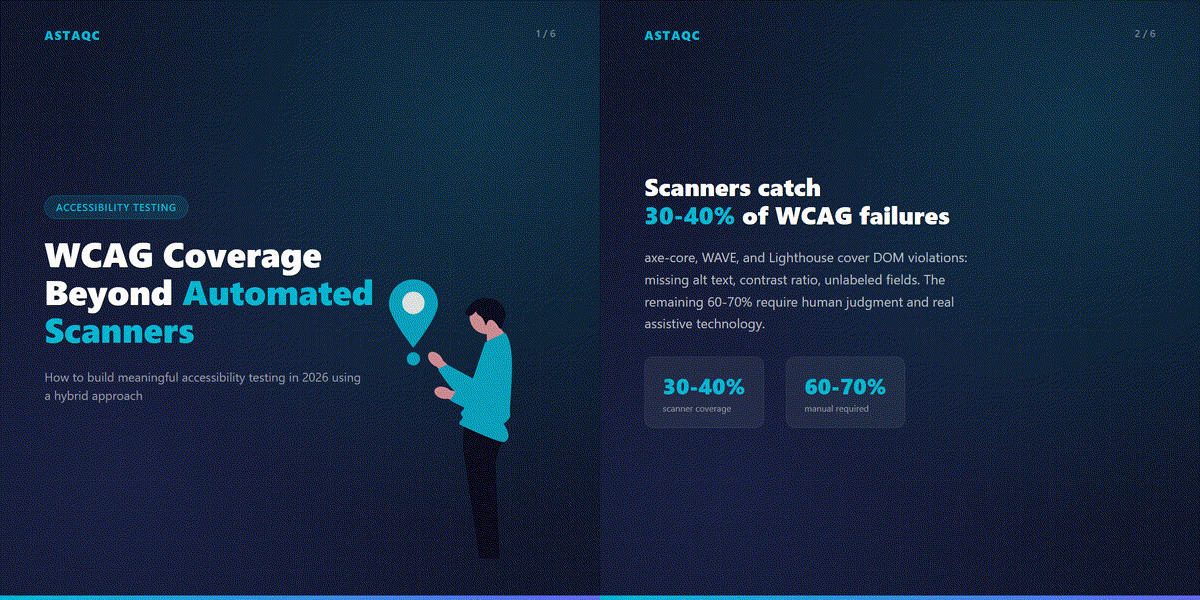
Automated accessibility scanners — axe-core, WAVE, Lighthouse, and similar tools — typically identify between 30% and 40% of WCAG 2.2 failures on a given page. The remaining failures require human judgment: testing keyboard navigation order and operability, validating that dynamic content updates are announced correctly to screen readers, assessing whether cognitive accessibility requirements are satisfied, and confirming that accessible names convey the correct meaning in context. Building meaningful WCAG coverage in 2026 means combining automated scanner output with structured manual testing using actual assistive technology, in a workflow that fits inside sprint cadence rather than sitting outside it as a periodic audit.
This guide covers what automated scanners actually detect and where they stop, the coverage gap that structured manual testing must fill, a hybrid testing strategy that scales within an engineering team, and how to integrate accessibility testing into CI/CD pipelines without creating a separate workflow. For broader context on testing strategy, see Astaqc’s complete software testing guide. Teams that need to establish or accelerate accessibility testing programs can engage Astaqc’s manual testing services and test automation services.
Automated scanners perform static analysis of the DOM against a set of rules derived from WCAG success criteria. They are reliable and fast for the categories of violation that can be determined without human interpretation: the presence or absence of an attribute, a contrast ratio that falls below a threshold, a heading hierarchy that skips levels, an ARIA role that is applied to an element type that cannot support it.
The categories of violations that scanners consistently detect include: missing or empty alt text on images, form fields without associated labels, interactive elements without accessible names, color contrast failures below the 4.5:1 ratio for normal text, page content without a language attribute, and documents without skip navigation links. axe-core, which TestInspector uses for accessibility assertions, exposes these violations at four severity levels: critical, serious, moderate, and minor. Critical and serious violations reliably block access for screen reader users and keyboard-only users; these are the violations where automated detection has the highest practical value.
| Violation Category | Scanner Detectable | Requires Manual Testing |
|---|---|---|
| Missing alt text | Yes — reliably | Meaningful alt text quality requires review |
| Color contrast ratio | Yes — computed values | Text over images may not be computable |
| Unlabeled form fields | Yes — DOM attribute check | Label accuracy and context require review |
| Keyboard navigation order | Partially — tabindex issues | Logical order requires human verification |
| Screen reader announcements | No | Requires testing with NVDA, JAWS, or VoiceOver |
| Dynamic content updates | No — static snapshot only | ARIA live regions require manual validation |
| Cognitive accessibility | No | Reading level, error messages, timeout warnings |
The 60–70% of WCAG 2.2 failures that automated scanners do not catch are not edge cases. They include several of the most functionally significant categories of accessibility failure for real users of assistive technology.
Keyboard navigation operability is the most common missed category. A scanner can verify that interactive elements are focusable and that tabindex values are not obviously wrong, but it cannot verify that the keyboard navigation order makes sense given the visual layout, that focus is not trapped inside a modal without a way to close it using only the keyboard, that a custom dropdown implemented with div elements responds correctly to arrow key input, or that a date picker built with a third-party library has a keyboard-accessible alternative path. These are user flow tests, not DOM attribute checks, and they require a tester who can navigate without a mouse.
Screen reader announcement accuracy is the second major gap. ARIA live regions, role attributes, and aria-label values all appear in the DOM and can be checked by a scanner against syntax rules. What the scanner cannot check is whether the announced text is actually useful in context: whether a live region announces cart updates in a way that makes sense without seeing the cart, whether an ARIA label describes what a button does rather than what it says, or whether an error message announcement is timed correctly relative to the user’s action. Testing this requires using NVDA, JAWS, or VoiceOver against the live application — not running a DOM analysis.
Dynamic content and single-page application interactions represent the third major gap. Automated scanners take a snapshot of the DOM at a point in time. They do not interact with the page, trigger state changes, or validate how the accessibility tree updates after a dynamic change. A modal that opens when a button is clicked and traps focus correctly cannot be validated by a scanner that never clicks the button. A search result that loads via an API call and needs to be announced to screen reader users cannot be validated by a scanner that does not observe the load event.
Cognitive accessibility requirements under WCAG 2.1 and the emerging WCAG 3.0 additions are a fourth gap. These include whether error messages describe the problem and the correction path clearly, whether timeout warnings give users adequate notice and a way to extend time, whether instructions are written at an appropriate reading level, and whether complex interactions have a simpler alternative path. None of these can be assessed through DOM analysis. Astaqc’s manual testing services include structured cognitive accessibility review as part of accessibility audit engagements.
A hybrid accessibility testing strategy uses automated scanners for volume and consistency and structured manual testing for coverage depth. The two layers address different failure categories and operate at different points in the development cycle, which means they are complementary rather than redundant.
The automated layer runs continuously: axe-core assertions integrated into the end-to-end test suite, Lighthouse accessibility audits in CI, and browser extension checks during development. This layer catches regressions introduced by new code before they reach staging. When a developer adds a form field without a label, the axe-core assertion in the test suite fails the build before the change is reviewed. When a color contrast ratio drops below threshold because a design token was updated, the CI audit catches it. This layer does not require a QA engineer to run manually and scales with the test suite without additional effort per-feature.
The manual testing layer addresses the coverage gap. It is structured, not ad hoc: a defined checklist based on WCAG 2.2 success criteria, assigned to specific user flows, run by a tester with assistive technology proficiency. The most efficient approach is component-level manual testing when a component is first built — validating keyboard navigation, screen reader announcements, and dynamic behavior at the component stage is faster and cheaper than discovering the failure in a full-flow audit six months later. Flow-level manual testing covers multi-step interactions: checkout, registration, authentication, search and filter patterns, data entry forms. These are run once per flow per release cycle, not on every commit.
The practical resourcing question is who runs the manual testing layer. In teams without a dedicated accessibility specialist, the most effective model is a QA engineer trained in assistive technology basics (NVDA with Chrome, JAWS basics, and VoiceOver on Safari) who applies the WCAG 2.2 checklist to the highest-risk flows. This does not require deep assistive technology expertise; it requires a repeatable process applied consistently. A QA engineer spending two hours per sprint on structured manual accessibility testing across the highest-risk flows provides substantially more accessibility coverage than a team relying exclusively on automated scanning, and substantially more sprint-cycle alignment than a quarterly external audit.
| Testing Layer | When It Runs | What It Covers | Who Runs It |
|---|---|---|---|
| Automated (axe-core assertions) | Every CI run | DOM violations: labels, contrast, ARIA syntax | Automated (no human required) |
| Automated (Lighthouse in CI) | On merge to main | Page-level score and regression tracking | Automated (no human required) |
| Manual (component-level) | When component is first built | Keyboard operability, ARIA announcement accuracy | QA engineer with assistive technology |
| Manual (flow-level) | Once per flow per release cycle | Full user journey operability with screen reader | QA engineer with assistive technology |
Integrating accessibility testing into CI/CD requires decisions about what to automate, what threshold to gate on, and how to handle failures without blocking velocity. The goal is to prevent regression — keeping the current accessibility state from getting worse with each release — rather than achieving a specific score in a single gate. Accessibility debt that has accumulated over years is not eliminated by adding a CI gate; it is reduced incrementally through sprint-by-sprint prioritization.
The recommended CI integration has three components. First, add axe-core assertions to the existing end-to-end test suite at the page or component level. TestInspector’s accessibility assertions use axe-core and allow configuration by severity level: assert that no critical or serious violations exist on the pages under test. This creates a regression gate without requiring a full WCAG audit on every run. Second, run Lighthouse accessibility audits in CI on a cron schedule against the staging environment, tracking the score over time. A score trend that is declining is a signal to prioritize accessibility work in the next sprint; a stable or improving trend confirms that regression prevention is working. Third, make accessibility violations visible in the same PR review workflow as other test failures. When an axe-core assertion fails in CI, the failure should appear in the same pull request status check as other test failures, not in a separate accessibility dashboard that requires a separate login to monitor.
The question of what severity to gate on affects how much the accessibility CI gate slows delivery. Gating on critical and serious violations is the standard starting point: these represent failures that make the application unusable for screen reader users and keyboard-only users, and they are the category where automated detection is most reliable. Gating on moderate and minor violations at the same time risks creating a gate that blocks on lower-severity issues in legacy components that are not being actively maintained, which creates friction without proportional benefit. A better approach for moderate violations is to log them as issues rather than blocking the build — they become visible and trackable without requiring immediate resolution before a deploy can proceed.
The complete testing guide from Astaqc covers how to integrate quality gates into CI/CD pipelines without creating velocity blockers. For teams that need to build or audit an accessibility testing program, Astaqc’s test automation services include axe-core assertion setup and Lighthouse CI configuration as part of CI/CD integration work. For organizations that need a formal accessibility audit with a WCAG 2.2 conformance report, Astaqc’s software testing services offer structured accessibility audit engagements separate from the ongoing CI integration work.
axe-core maintains a public mapping of which WCAG 2.1 and 2.2 success criteria its rules cover, and at what confidence level. The Deque axe-core documentation lists each rule, the WCAG success criterion it addresses, and whether the violation is definitive (the tool is certain there is a violation) or needs review (the tool has flagged a potential issue that requires human assessment). Success criteria that axe-core covers definitively include 1.1.1 (non-text content), 1.3.1 (info and relationships), 1.4.3 (contrast minimum), 2.4.2 (page titled), and 4.1.2 (name, role, value). Success criteria that require manual testing include most of 1.3 (adaptable), 2.1 (keyboard), 2.5 (input modalities), and 3.x (understandable). Using the axe-core documentation as your manual testing checklist for the non-automated criteria is the most efficient approach for building complete coverage.
The minimum viable setup has two components: axe-core assertions in the existing test suite gating on critical violations, and one hour of structured manual testing per sprint applied to the highest-risk user flow. The critical violation gate prevents the most damaging accessibility regressions from shipping. The manual testing hour, applied to a single flow per sprint using NVDA with Chrome and a WCAG checklist, builds institutional knowledge about the application’s accessibility state and catches the keyboard operability and screen reader announcement issues that the scanner cannot reach. This combination does not require a dedicated accessibility specialist and provides substantially better coverage than scanning alone. Astaqc’s manual testing services can supplement this with specialist review for high-stakes flows or compliance milestones.
Accessibility failures that prevent task completion for users of assistive technology — blocked keyboard navigation on a form, a modal that traps focus without a keyboard exit, a checkout button that is not announced by a screen reader — are P1 severity by the same logic as any other bug that prevents core task completion. These are not accessibility bugs separate from functional bugs; they are functional failures for a segment of users. Color contrast failures and missing alt text on decorative images are P2 or P3 depending on context. Cognitive accessibility issues — confusing error messages, missing timeout warnings — sit at P2 for most applications. Prioritizing accessibility failures within the existing severity framework rather than maintaining a separate accessibility backlog reduces the organizational friction of getting them addressed.
WCAG conformance is defined at the standard level, not at the assistive technology level — conforming to WCAG 2.2 does not require testing with every screen reader and browser combination. In practice, the most common approach is to test with NVDA on Chrome (the combination used by the largest share of screen reader users according to the annual WebAIM screen reader survey) and verify that the key interactions work. Testing with JAWS on Chrome and VoiceOver on Safari adds coverage for users of those tools and is worth doing for high-stakes flows. The practical goal is verifiable operability with the most-used assistive technology combinations, not exhaustive cross-AT testing. For applications facing legal accessibility requirements, the specific testing requirements may be defined by the applicable standard or regulation rather than by the WCAG specification itself.
Third-party component accessibility failures require a different response than first-party failures. For components where the vendor has a documented remediation plan and timeline, documenting the known violation, the vendor’s ETA, and a workaround or alternative path for affected users is the appropriate short-term response. For components where no remediation is planned, the decision is whether to replace the component, build a custom accessible alternative, or accept the conformance gap with documentation. Filing a detailed bug report with the vendor — including the specific WCAG success criterion, the failure mode, the assistive technology and browser combination affected, and reproducible steps — creates a record and increases the probability of a fix in a future release. Astaqc’s software testing services can support accessibility audits that include third-party component assessment as part of the scope.
Automated accessibility scanners are a floor, not a ceiling. They catch the structural violations a machine can detect — missing alt text, unlabeled form fields, insufficient color contrast — but they cannot tell you whether a screen reader user can actually complete your checkout flow, or whether your keyboard navigation order makes sense to someone who cannot see the page layout.
September 27, 2026


Sign up to receive and connect to our newsletter

We founded ASTAQC as a tight-knit group of professional Software Testers and software developers.
Subscribe to our Newsletter