October 12, 2026

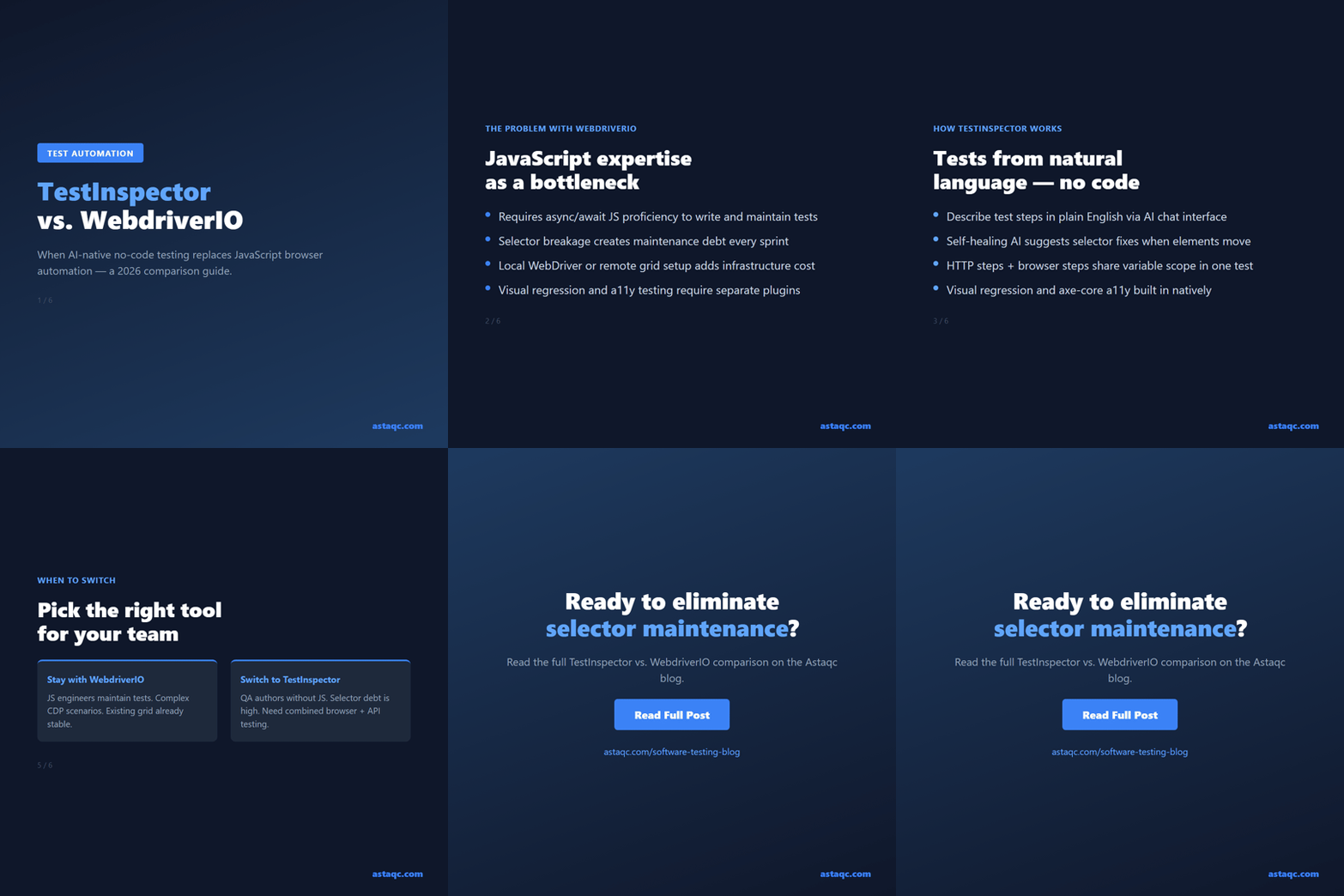
WebdriverIO is a Node.js automation framework for browser testing that uses the W3C WebDriver protocol to control browsers through JavaScript code. It is widely adopted, mature, and capable of handling complex test scenarios, but it requires JavaScript proficiency, framework configuration, and ongoing maintenance as selectors, browser drivers, and dependencies evolve. TestInspector takes a different approach: an AI chat interface generates tests as structured steps without code, a self-healing selector engine suggests alternatives when elements change, and browser execution happens on managed infrastructure across Chrome, Firefox, Edge, and Safari without a local Node.js environment or remote grid. The practical trade-off is between framework flexibility and maintenance overhead — WebdriverIO gives teams full control of the test stack; TestInspector removes the requirement to maintain one.
WebdriverIO uses the $ and $$ selector functions to interact with DOM elements, chains browser commands like .click(), .setValue(), and .waitForDisplayed(), and asserts with a matcher library such as expect-webdriverio. A test file is a JavaScript module, the test runner is Mocha, Jasmine, or Cucumber, and configuration lives in wdio.conf.js. The initial setup requires installing WebdriverIO and its dependencies via npm, choosing runner and reporting plugins, and ensuring browser drivers or a remote grid connection is available.
The setup cost is manageable for a team with JavaScript engineers. The ongoing cost is higher. Selector maintenance is the most common complaint: CSS and XPath selectors break when developers change component structure, class names, or IDs, and each broken selector requires an engineer to open the failing test, identify the new DOM path, update the selector, and push a fix. Infrastructure maintenance follows a similar pattern: WebdriverIO major version upgrades, browser driver compatibility updates, and Node.js version changes require periodic framework work unrelated to test coverage quality.
Test authoring speed is a friction point for teams with QA engineers who lack JavaScript background. Writing a test for a multi-step checkout flow, a form with dynamic validation, or a table with sortable rows requires understanding WebdriverIO's async command model, selector strategy, and wait behavior. The learning curve is not steep for engineers who already write JavaScript, but it is a real barrier for manual QA engineers transitioning to automation. Astaqc's test automation services include framework evaluation for teams deciding between code-first and no-code approaches. The manual vs. automated testing guide covers how to evaluate when framework overhead outweighs the flexibility benefit.
TestInspector generates tests from natural-language descriptions entered into its AI chat interface. The output is a sequence of structured steps — navigate to a URL, click an element by its visible label, fill an input by placeholder text, assert that a specific string appears on the page — stored as a step list that runs directly without code. An engineer who can describe what a test should do can create and maintain tests without installing a framework, configuring a runner, or writing JavaScript.
Self-healing reduces selector breakage maintenance. When a step fails because its target element has moved or changed, TestInspector's AI analyzes the page context and suggests alternative selectors based on the element's semantic role, visible label, and surrounding structure. The engineer approves the suggestion, and the test continues without a manual code fix. This changes the maintenance activity from debugging CSS paths to approving AI suggestions — a faster operation that does not require JavaScript knowledge and does not block QA engineers on developer availability.
HTTP request steps enable API-level testing within the same test suite. A test can make a POST request to an authentication endpoint, capture the token from the JSON response using a variable, navigate to a protected page, and assert that the page content reflects the authenticated state — all within a single TestInspector test, without custom glue code. Variable interpolation supports {{VAR}}, {{TIMESTAMP}}, {{ALPHANUMERIC}}, and {{TOTP:secret}}, with scope hierarchy across test, suite, and organization levels. Encrypted storage is used for sensitive values such as API keys and TOTP secrets.
Visual regression compares screenshots using SSIM against an approved baseline, with crop and exclusion selectors for dynamic regions. Accessibility assertions use axe-core and report issues by WCAG severity level. Both are native features. Cross-browser execution on Chrome, Firefox, Edge, and Safari happens through managed infrastructure — no local WebDriver setup and no remote grid subscription required for standard cross-browser coverage. Learn more at TestInspector.
The table below compares the two tools across the dimensions most relevant to teams evaluating a switch or choosing a primary browser testing tool.
| Dimension | WebdriverIO | TestInspector |
|---|---|---|
| Test authoring | JavaScript (Node.js, async/await) | Structured steps via AI chat (no code) |
| Selector healing | Manual debugging and update required | AI-suggested alternative selectors on failure |
| Browser support | Any WebDriver-compatible browser | Chrome, Firefox, Edge, Safari (managed) |
| Infrastructure | Local drivers or remote grid | Managed — no local setup required |
| API/HTTP testing | Via separate tool or custom Node.js code | Native HTTP steps with variable interpolation |
| Visual regression | Via plugin (wdio-image-comparison-service) | Native SSIM screenshot comparison |
| Accessibility testing | Via plugin (axe-webdriverio) | Native axe-core integration with severity levels |
| CI/CD integration | Native reporters, WDIO services, GitHub Actions plugin | Trigger API; webhook for results; native scheduler |
| Customizability | High — full Node.js ecosystem, custom plugins | Medium — structured steps constrain edge cases |
| Programming required | Yes — JavaScript proficiency required | No — AI chat interface for test creation |
The comparison highlights where the two tools diverge most: authoring model, infrastructure ownership, and extensibility. WebdriverIO is more flexible for complex scenarios — network request interception with custom logic, browser extension testing, custom CDP commands. TestInspector covers the majority of UI and API testing scenarios and trades flexibility for a lower maintenance baseline. Astaqc's hire a QA team service includes tool selection consulting for teams evaluating no-code against code-first frameworks.
Choose WebdriverIO when the team has JavaScript engineers who write and maintain the test framework as part of their normal workflow, when tests need to import utilities or types from the application codebase, when the team has infrastructure resources to maintain browser drivers and grid configuration, or when specific WebdriverIO plugins or integrations are already established and working. Teams running large suites against Selenium Grid or BrowserStack with stable, well-maintained test code are unlikely to gain from switching — the maintenance overhead they manage is proportionate to the control they receive.
Choose TestInspector when QA engineers need to author and maintain tests without a JavaScript background, when selector maintenance is consuming a disproportionate share of QA bandwidth, when tests need to cover browser interactions and HTTP API calls in the same flow without separate tooling, or when the team needs built-in visual regression and accessibility testing without adding plugins. Teams transitioning from manual testing to automation and teams where QA is organizationally separated from development benefit most from the lower authoring barrier.
The migration path from WebdriverIO to TestInspector is incremental. TestInspector's browser extension records new tests against the same application surfaces covered by existing WebdriverIO tests. Tests requiring advanced WebdriverIO features can remain in WebdriverIO while simpler smoke and regression tests move to TestInspector, a hybrid arrangement that some teams run during a transition period. Astaqc's test automation services include migration planning for teams making this transition. The QA outsourcing guide covers when bringing in external expertise accelerates framework transitions.
TestInspector covers the majority of UI and API testing scenarios that WebdriverIO handles: form interactions, navigation, assertions on page content, cross-browser execution, HTTP API testing, visual regression, and accessibility. Scenarios that require deep WebdriverIO customization — network request interception with custom response modification, browser extension testing, custom CDP commands — are outside TestInspector's structured step model. For most QA teams testing standard web applications, the coverage overlap is high and the gap is limited to specialized scenarios.
TestInspector exposes a trigger API that accepts HTTP POST requests from any CI/CD system — GitHub Actions, Jenkins, GitLab CI, CircleCI. Test results are available via webhook. WebdriverIO has deeper native CI/CD integration through reporters, WDIO services, and official GitHub Actions support. Teams with complex reporting pipelines may need to adapt their integration approach. For teams that run tests on a schedule or on deployment events, TestInspector's native scheduler and trigger API cover the common patterns without custom integration code.
There is no automated migration from WebdriverIO test scripts to TestInspector structured steps. Existing tests must be recreated — either by recording new tests using the TestInspector browser extension, by using the AI chat interface to describe each test scenario, or by a combination of both. Teams typically prioritize migration by coverage value: smoke tests and critical path tests first, infrequently-run regression tests later. Tests covering scenarios that require WebdriverIO customization can remain as a parallel suite.
Self-healing suggestions require approval before they are saved. The engineer reviews the suggested alternative selector and either approves it, selects a different suggestion, or provides a custom selector. Automatic approval without review is not available — the workflow surfaces the suggestion for human confirmation. This prevents incorrect auto-healed selectors from creating silent test changes where a test passes but is no longer testing the intended element.
TestInspector's native HTTP request steps support GET, POST, PUT, PATCH, and DELETE with request headers, body payloads, and response assertions on status code and JSON path values. Browser steps and HTTP steps share variable scope within a test, so a session token captured from a login API call can be used in subsequent browser steps. Teams that currently use WebdriverIO for browser tests and a separate tool for API tests can consolidate both into TestInspector for flows that benefit from a combined approach. See TestInspector for HTTP step documentation.
Self-healing handles small selector changes automatically, but structural redesigns — page navigation changes, removed pages, reorganized layouts — require explicit test updates. The update workflow uses the same AI chat interface and browser extension used to create tests: describe what changed, record the new flow, approve the updated steps. The advantage is that the update process does not require JavaScript code changes, so QA engineers can update tests without developer support. Astaqc's manual testing services cover exploratory testing during redesigns while automated tests are being updated.
October 12, 2026


Sign up to receive and connect to our newsletter

We founded ASTAQC as a tight-knit group of professional Software Testers and software developers.
Subscribe to our Newsletter