August 13, 2026
TestInspector replaces TestRail for teams whose primary need is test execution with coverage tracking rather than manual test case repository management. TestRail is a test case management system that stores test cases, plans, and run results but has no built-in execution engine — every automated test run must be initiated externally and the results imported. TestInspector is an AI-native test execution platform that creates, runs, and tracks tests in one environment, eliminating the integration layer and maintenance overhead of connecting a test management tool to an automation framework.
For teams determining whether the overhead of a two-tool stack is justified, the answer turns on how much of their testing is manual versus automated, and how significant the integration maintenance cost has become. This guide covers where the two tools differ, where each fits, and how to migrate from TestRail to TestInspector without losing coverage continuity. For broader context on how manual and automated approaches structure a QA practice, the manual vs. automated testing guide covers how to scope coverage across both dimensions.
TestRail is a web-based test management platform that provides structured storage for test cases, test plans, test runs, and historical results. Teams use it to define manual test cases, organize them into suites, track which tests have been executed against a specific build, and report coverage metrics. For organizations with large manual QA practices, TestRail provides the structure that spreadsheets cannot: hierarchical test suites, customizable fields, milestone tracking, and multi-tester coordination on shared test runs.
The limitation emerges when teams move toward automation. TestRail has no execution capability of its own. Running automated tests still requires a separate automation framework — Selenium, Playwright, Cypress, or a similar tool — plus a CI/CD pipeline to trigger runs, plus the TestRail API or a third-party integration to push results back into TestRail. Maintaining this integration layer adds engineering overhead that grows as the test suite scales: the integration must be updated when the automation framework is upgraded, when TestRail's API changes, or when the CI/CD configuration is modified. Teams running this stack discover that a meaningful proportion of their automation maintenance effort goes into keeping the TestRail integration working rather than into the tests themselves.
A second limitation is that TestRail's test case records — the authoritative definition of what should be tested — frequently drift out of sync with what the automation actually covers. When a developer adds an automated test, the corresponding TestRail test case may or may not be updated. When a feature changes, TestRail test cases require manual updates in addition to the automation changes. Over time, the TestRail repository becomes an inaccurate picture of actual coverage because it is maintained independently from the automation. For teams evaluating QA tooling options, the Astaqc software testing services team works with organizations at different stages of this transition to scope whether a combined tool or separate tools better fit their delivery model.
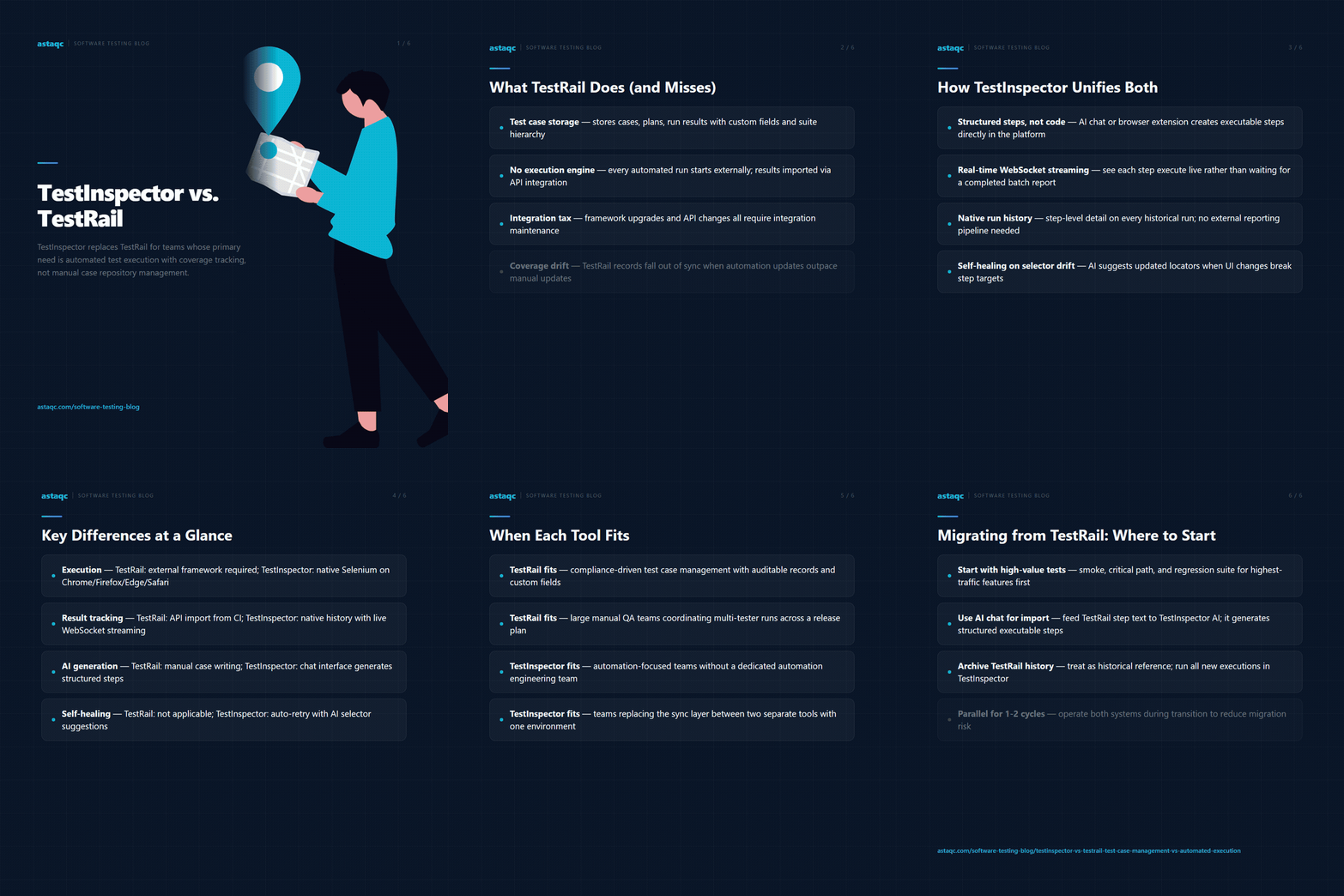
TestInspector is an AI-native no-code test automation platform where test cases and test execution live in the same environment. Tests are defined as structured steps — not code — using either an AI chat interface that generates steps from natural language descriptions or a browser extension that records steps from real browser interactions. The same steps that define the test are what the runner executes. There is no separate automation framework to maintain, no import/export step to synchronize test definitions with test results, and no integration layer to keep alive.
When a test runs, TestInspector streams execution in real time via WebSocket — QA engineers see each step execute as it happens rather than waiting for a completed report. Run history is stored natively, so a team can view any historical run for any test, see exactly which steps passed and failed, and trace coverage over time without building a reporting pipeline. This eliminates the TestRail use case for execution tracking: the execution data lives where the test definition lives.
For teams that have invested in TestRail to track which tests cover which requirements, TestInspector's suite hierarchy provides an equivalent organizational structure. Tests are organized into suites, which can map to features, user stories, or requirement areas. Variable scoping follows the hierarchy: variables defined at the suite level are available to all tests in that suite; variables defined at the org level are available to all suites. This mirrors the way TestRail's hierarchical test suites organize coverage by feature or module, without requiring a separate management tool.
TestInspector's self-healing runner handles selector drift — when a UI element changes and a scripted selector no longer matches — by using AI to suggest updated selectors and auto-retrying the affected step. In a TestRail plus external automation stack, selector drift produces a failing test that must be diagnosed and fixed manually before the next run can produce a meaningful result. Self-healing reduces the maintenance overhead that typically drives teams toward lighter-weight approaches after their automation suite reaches a certain scale. Additional product details are at TestInspector.
| Dimension | TestRail | TestInspector |
|---|---|---|
| Test case storage | Dedicated repository with custom fields, milestones, and suite hierarchy | Test suites with structured steps; no separate repository needed |
| Test execution | No built-in execution — requires external automation framework plus API integration to import results | Native execution via Selenium on Chrome, Firefox, Edge, Safari; no framework required |
| Result tracking | Results imported via API or plugin from external CI/CD runs | Native run history with step-level detail and real-time WebSocket streaming |
| Coverage reporting | Coverage metrics based on TestRail run records, which require manual updates or API sync | Coverage derived directly from execution data — no sync layer required |
| Manual test management | Full-featured: manual test runs, tester assignment, bulk result entry | Limited — TestInspector is primarily for automated execution, not manual case tracking |
| CI/CD integration | Results pushed in from CI via API; TestRail does not trigger runs | Scheduled runs via cron/interval, CI/CD trigger API, and MCP tokens for AI coding environments |
| Self-healing on failure | Not applicable — TestRail stores results, does not run tests | AI-powered selector suggestion and auto-retry on selector drift |
| AI test generation | Not built in — test cases are written manually | AI chat interface generates structured test steps from natural language descriptions |
| Suitable team profile | Teams with large manual QA practices requiring formal test case management | Teams automating web application coverage without a dedicated QA engineering team |
TestRail remains the better choice in specific contexts. The primary case is organizations with formal test case management requirements driven by compliance: regulated industries — healthcare, finance, regulated software — often require documented test cases with specific fields (test objective, preconditions, expected result, actual result, tested by, date tested) that can be reviewed by an auditor. TestRail's customizable fields and export capabilities are designed for this workflow. If your test documentation is a compliance deliverable, a test case management tool with structured record-keeping is appropriate.
TestRail also fits teams with large manual QA operations where testers work through test runs collaboratively — multiple testers assigned to different sections of a test plan for a release, with a test manager coordinating coverage and tracking completion. TestInspector is an automated execution platform; it does not provide the manual test run coordination workflow that TestRail is built around.
TestInspector is the better fit when a team's primary goal is to build and run automated test coverage for web applications without managing an automation framework. If the current workflow involves maintaining a Selenium or Playwright test suite alongside a TestRail repository, the overhead comes from operating two separate systems that require continuous synchronization. TestInspector collapses these into one environment. The tests run, the results are stored, and coverage is visible without a separate reporting pipeline. For teams currently scoping this transition, the Astaqc test automation services team can assess which approach fits the existing delivery workflow and team skill set. Teams that need to scale QA capacity without adding automation engineers may also find the hire a QA team option relevant for TestInspector-backed managed testing engagements.
A migration from TestRail to TestInspector does not require re-creating every test case from scratch. The practical approach is to identify the tests that run most frequently and deliver the most defect-detection value — typically smoke tests, critical path tests, and the regression suite for the highest-traffic features — and recreate those in TestInspector first. Low-frequency manual test cases in TestRail that cover edge cases or rarely-run scenarios can remain in TestRail as documentation without active execution.
For the migration itself: use TestInspector's AI chat interface to generate structured steps from the text descriptions in existing TestRail test cases. A TestRail test case with a written step sequence can be fed into the AI interface, which produces a structured step sequence that TestInspector can execute. For tests that need to be recorded from actual browser interaction, TestInspector's browser extension captures the interaction directly.
Historical coverage data in TestRail — which tests passed on which build, how pass rates have trended — is not automatically importable into TestInspector. For teams that need to retain this history for compliance or reporting purposes, the practical approach is to archive the TestRail project and treat it as a historical reference rather than an active tool, while using TestInspector for all new runs. For teams that need both historical data and active execution tracking during the transition period, running both systems in parallel for one or two release cycles before fully migrating is a lower-risk approach. The QA outsourcing guide covers how managed QA teams can handle tool migrations without disrupting active coverage. For teams handling documentation during or after migration, Astaqc testing documentation services can help produce coverage maps that bridge the historical TestRail record and the new TestInspector environment.
For teams primarily running automated web application tests, TestInspector replaces the test management and execution tracking functions that teams typically use TestRail for — test definition, run history, and coverage reporting all live in TestInspector. The gap is in manual test case coordination: teams with active manual QA workflows, where testers work through a shared test run and log results step by step, still need a dedicated test management tool for that workflow. For automation-focused teams, the combined environment eliminates the integration maintenance that a separate management tool requires.
TestInspector organizes tests into suites that can be structured to mirror requirement areas, features, or user stories. A suite named for a specific feature contains the tests that cover that feature, and coverage is visible at the suite level in run history. This provides requirement-level coverage traceability without requiring a separate mapping field or integration. Teams that need formal requirement traceability with explicit field-level linkage between test cases and requirement IDs should evaluate whether TestInspector's suite-level organization meets their documentation standard, or whether a compliance-driven test management tool is required for that specific need.
TestInspector provides a CI/CD trigger API and MCP tokens for integration with Claude Code, Cursor, and similar AI coding environments. Results are stored natively and accessible via the run history in the TestInspector interface. For teams that need to push results into external dashboards or management tools, the CI/CD API provides a programmatic interface for retrieving run outcomes. TestInspector does not have a native export to TestRail or similar test management systems, reflecting its design as a replacement for rather than a complement to the separate management tool layer.
TestInspector's self-healing runner handles the most common source of intermittent failures — selector drift, where a UI element's locator changes between test authoring and execution. For timing-related failures where an element is present but not yet ready for interaction, TestInspector uses explicit wait logic built into the step execution engine. For tests that fail intermittently due to environment instability rather than test design issues, run history provides the data to distinguish a consistently failing test from an intermittently failing one. The software testing cost guide discusses how automation maintenance costs factor into the total cost of ownership for different tooling approaches.
TestInspector is an automated test execution platform. It does not provide a manual test execution interface where a tester works through steps and logs pass/fail results manually. Teams with active manual testing workflows that require formal step-by-step manual run tracking — for compliance, certification, or formal acceptance testing — need a separate tool for that workflow. TestInspector is most effective when the goal is to automate tests that have been previously run manually, replacing manual execution with repeatable automated runs rather than augmenting the manual process. The Astaqc manual testing services team can assist with defining initial test suites and coverage priorities for teams transitioning from manual tracking to TestInspector automation.
TestInspector requires no framework installation or infrastructure setup. The browser extension installs in a few minutes for recording tests from browser interactions. An organization can have its first test defined and running within a day of creating an account, without the build system configuration, dependency management, or language-specific tooling that code-based frameworks require. For teams coming from TestRail, the absence of a setup phase for TestInspector contrasts with the initial configuration required to connect TestRail to an external automation framework — API keys, CI/CD plugin installation, results mapping configuration — which typically takes several days for a team that has not done it before.
TestRail and TestInspector solve different problems: TestRail is a repository for documenting what should be tested; TestInspector is a platform for defining and running what is tested. For teams whose primary work is automated execution rather than manual case management, the integration overhead of connecting the two disappears when they consolidate into a single tool.
August 13, 2026


Sign up to receive and connect to our newsletter

We founded ASTAQC as a tight-knit group of professional Software Testers and software developers.
Subscribe to our Newsletter