
October 29, 2026

Pagination testing fails for one primary reason: the test only checks the first page. A test that confirms 10 rows appear, the table loads, and the first record matches expectations is technically passing — but it has not verified that clicking "Next" returns different records, that the API call carries the correct offset, or that the previous page restores when the user navigates back.
The problem is structural. Stateful tests require sequencing: load page one, extract the cursor or verify the offset increments, trigger the next load, then assert the new data appeared without the old data remaining. This sequence is straightforward in a test framework with variables, but test suites that lack state management skip it entirely.
Infinite scroll adds a browser-level layer. The test must simulate scroll events deep enough to trigger the next batch, then confirm the DOM expanded. Scroll depth, load timing, and the presence of a spinner while data loads each need an assertion. Tests that only check the initial render miss all of this.
Common failure patterns include: asserting the presence of a list container but not item count, failing to wait for the loading state to clear between scroll events, and not validating that the last item on page N differs from the first item on page N+1. Test automation services that account for state transitions catch these gaps; services that focus only on presence checks do not.
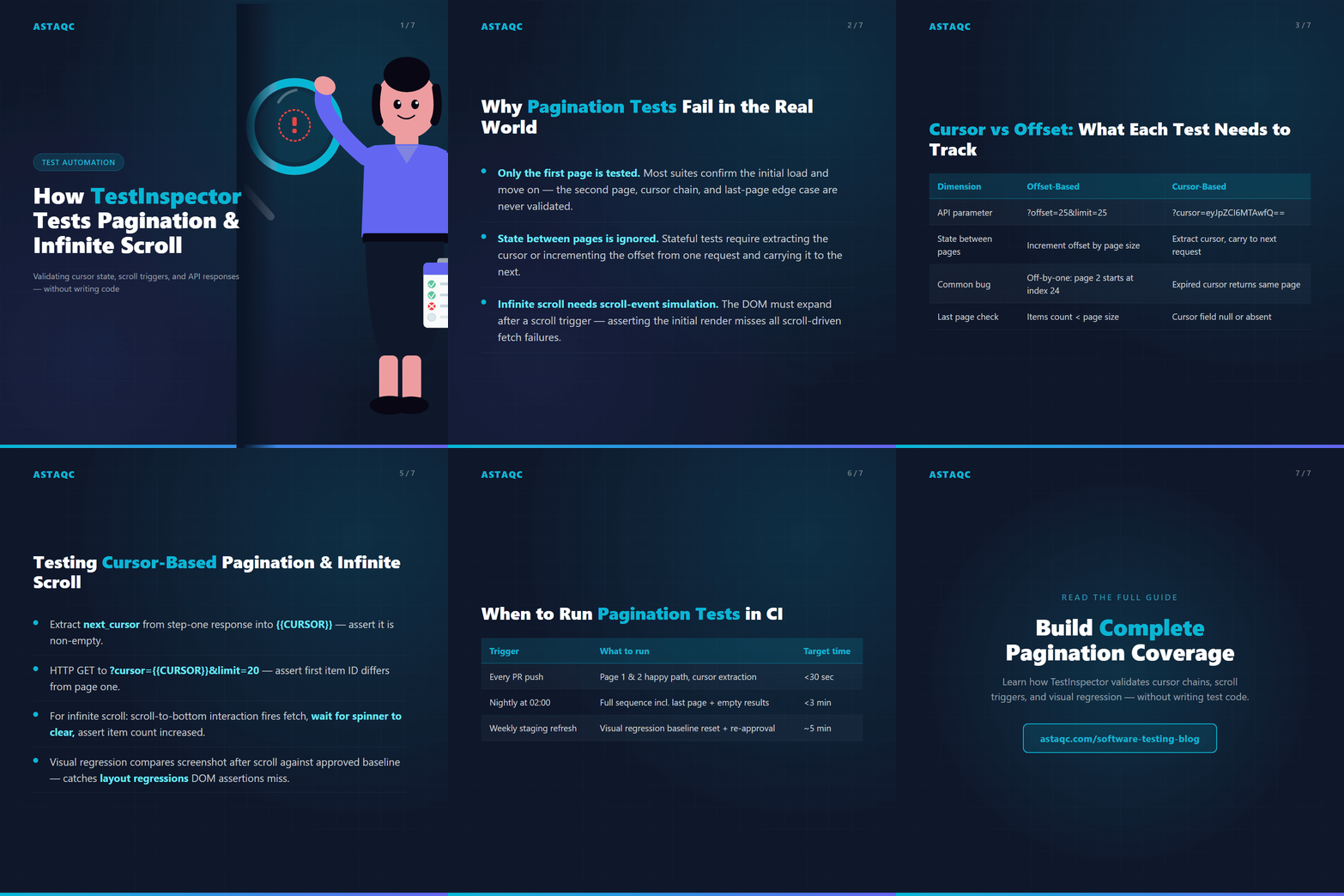
The two dominant pagination patterns each require different test approaches. Understanding which your API uses determines how to structure the assertion sequence.
| Dimension | Offset-Based | Cursor-Based |
|---|---|---|
| API parameter | ?page=2&limit=25 or ?offset=25&limit=25 | ?cursor=eyJpZCI6MTAwfQ==&limit=25 |
| State between pages | Increment offset by page size | Extract cursor from response, carry to next request |
| Test assertion | Verify item at offset N differs from item at offset 0 | Verify cursor in response is non-empty, then verify next page differs |
| Common bug | Off-by-one: page 2 starts at index 24 instead of 25 | Cursor reuse: expired cursor returns the same page |
| Last page check | Verify items count is less than page size on final page | Verify cursor field is null or absent on final page |
Infinite scroll typically uses cursor-based pagination under the hood, even when the interface does not show page numbers. The browser intercepts a scroll event, fires an API call with the current cursor, and appends the results to the DOM. Testing this requires both a DOM-level scroll trigger assertion and an HTTP-level cursor validation.
TestInspector handles offset pagination through HTTP request steps combined with variable interpolation. The test structure follows a defined sequence: make the first API call, assert the response, increment the offset using a variable, make the second call, assert that the results differ from the first. No framework code is required — the test logic lives in structured steps with built-in assertions.
To test offset pagination in TestInspector:
?offset=0&limit=25.{{FIRST_ITEM_ID}}.?offset=25&limit=25.{{FIRST_ITEM_ID}}, confirming the pages return genuinely different data.The variable interpolation system in TestInspector supports dynamic extraction from JSON response paths. The cursor or offset value from step N passes directly into the URL of step N+1. Encrypted storage is available for sensitive pagination tokens that should not appear in plain text in test logs. Variable scope can be set at the test, suite, or org level, so a base URL defined at the org level applies to every test without duplication.
For teams using TestInspector to cover backend APIs alongside UI flows, offset tests run as part of the nightly CI schedule without any framework maintenance. The test configuration reuses the same org-level base URL variable, so staging and production runs require only a context switch, not a test rewrite.
Cursor-based pagination requires extracting the next cursor from each response before it expires. TestInspector's variable interpolation handles this natively. The cursor value from step one's response body populates the URL parameter for step two, creating a chained sequence that mirrors exactly what the browser does during infinite scroll.
For a REST API returning {"data": [...], "next_cursor": "eyJpZCI6MTAwfQ=="}, the test sequence is:
/api/items?limit=20 — assert status 200, assert data array length is 20, extract next_cursor into {{CURSOR}}.{{CURSOR}} is non-empty, confirming the API signaled that more data exists./api/items?cursor={{CURSOR}}&limit=20 — assert status 200, assert data array length is 20, and assert the first item ID differs from the first item on page one.For UI-level infinite scroll, TestInspector's DOM step assertions verify the item count before and after a scroll trigger. A scroll-to-bottom interaction fires the browser's scroll event, the test waits for the spinner to disappear as a DOM state assertion, and then checks that the item count increased. Visual regression via SSIM comparison catches layout regressions — for example, content from the previous batch overlapping new content during a loading state.
This approach covers four failure modes that unit tests miss: expired cursors returning stale data, scroll events that do not fire the API call, spinners that persist indefinitely when a fetch fails silently, and duplicate items appearing at page boundaries. For a thorough view of the assertion gap in automated suites, see why tests pass but software still breaks.
Pagination and infinite scroll have a visual dimension that HTTP assertions cannot catch. After loading subsequent pages, layout issues surface: items from the previous batch shift position, column widths reflow, or the loading skeleton persists on screen after data arrives. These are rendering bugs, not API bugs, and they require screenshot comparison to detect.
TestInspector's visual regression uses SSIM screenshot comparison against an approved baseline. The workflow for pagination is:
Crop and exclusion selectors prevent false positives from dynamic content — timestamps, avatars that load asynchronously, or advertisements. The exclusion is applied at the baseline approval stage, so the comparison focuses on structural layout rather than content that intentionally changes run to run.
This is particularly relevant for data tables and list views where the paginated state includes a different number of rows than the initial state. Baseline approval handles the expected row count difference; the SSIM comparison then catches only unintended visual changes in the layout itself.
For teams building out end-to-end coverage across visual and functional assertions, Astaqc's software testing services include visual regression setup and baseline management alongside functional automation. The combination catches bugs that either approach alone misses. See also the complete guide to software testing for a broader framework on how visual and functional testing layers complement each other.
Pagination tests belong in two places: the integration test suite that runs on every pull request, covering the core happy path — page one loads, page two loads with different data, last page returns no cursor — and a nightly scheduled run that covers edge cases including empty result sets, single-item results, and high-offset requests.
TestInspector's scheduler supports cron expressions, fixed intervals, and one-time runs. A typical configuration for a data-heavy application:
The CI/CD API trigger fires after a successful deployment to staging. TestInspector's WebSocket streaming gives real-time pass/fail status per step, so the pipeline can block promotion to production while the test runs rather than waiting for a polling interval.
Self-healing auto-retry handles the transient failures that are especially common in pagination tests: a slow load causes a DOM assertion to fail on the first attempt, and self-healing retries the step after a brief wait before flagging a real failure. This reduces false negatives without hiding genuine bugs, because the AI selector suggestions surface the actual cause when a step fails consistently rather than transiently.
For teams integrating pagination tests into a broader automation strategy, the test automation strategy guide for 2026 covers coverage models that account for stateful interaction flows. The manual testing service at Astaqc complements automated coverage with exploratory sessions that reveal edge cases automated suites have not yet modeled.
The most common bug is not testing beyond the first page. Tests that confirm the initial load but never trigger the next page miss off-by-one errors, duplicate items at page boundaries, and cursor expiration issues. The second most common is asserting presence but not uniqueness: checking that items exist without verifying the second page shows different items than the first.
TestInspector extracts the cursor from the response body of the first step using a JSON path variable — extracting next_cursor from the response into {{CURSOR}}. The variable interpolation system then injects that value into the URL or request body of the next step automatically. No custom script is needed to carry state between steps, and the variable can be scoped at the test, suite, or org level depending on whether the cursor is shared across test sequences.
Yes. TestInspector's browser interaction steps include scroll triggers that fire the scroll event without requiring custom JavaScript. After the scroll, DOM assertions check that the item count increased and that the loading spinner is no longer visible. The combination covers both the trigger and the outcome without test scripting, and visual regression adds a screenshot comparison layer to catch layout regressions that DOM assertions cannot detect.
For cursor-based APIs, assert that the cursor field in the response is null or absent. For offset-based APIs, calculate the expected final page — total items divided by page size, rounded up — and assert that the items array length is less than the page size on that final request. Both patterns require knowing the total item count, which the API typically exposes in a total or count field in the response body.
The happy path — page one loads, page two loads with different data — belongs in the PR regression suite and runs on every commit. Edge cases such as empty result sets, last-page boundaries, and expired cursors are better suited to a nightly scheduled suite. This keeps the PR feedback loop under 30 seconds for pagination checks while still covering the full lifecycle on a regular cadence.
At minimum: a screenshot comparison of the paginated state against an approved baseline, with exclusions for dynamic content like timestamps and user avatars. Additional assertions worth adding include checking that the item count in the DOM matches the count returned by the API, asserting that no items from page one remain visible after the view transitions to page two, and verifying that scroll position is preserved correctly on back-navigation.
Pagination and infinite scroll testing is where the gap between "tests pass" and "the feature works" is widest. A suite that only checks the first load misses the majority of real user behavior. TestInspector closes that gap through HTTP request step chaining, variable interpolation for cursor and offset state, DOM assertions for scroll-triggered loads, and visual regression for layout consistency across page transitions.
For teams that need structured QA coverage across stateful UI flows, Astaqc's QA team hire service provides certified engineers who design and maintain test suites covering the full interaction lifecycle. See the complete guide to manual testing vs automated testing for context on where each approach fits within a comprehensive coverage model.
Pagination tests that only check the first page miss the majority of real user behavior — cursor extraction, off-by-one boundaries, and scroll-triggered fetches all require sequential state that simple load assertions cannot cover.
October 29, 2026


Marcus Chen is a software testing engineer specializing in API testing, performance engineering, and security QA. He has led QA programs for enterprise SaaS, fintech, and healthcare technology companies across three continents.

Sign up to receive and connect to our newsletter

We founded ASTAQC as a tight-knit group of professional Software Testers and software developers.
Subscribe to our Newsletter


