September 29, 2026
How TestInspector Handles Authentication Flows in No-Code Testing: Session Tokens, Cookie Persistence, and Stateful Browser Context
Testing authentication flows is one of the most common points where no-code test tools fail QA teams. The tool can click a login button, but if it cannot persist the session state that login creates, every subsequent step must re-authenticate. TestInspector handles this by maintaining stateful browser context across test steps, storing authentication tokens and cookies as variables, and providing HTTP request steps for token-based flows that do not use the browser at all.
This guide covers how TestInspector approaches authentication testing, including the step types that support it, the variable system that manages credentials and tokens, and the configuration choices that determine whether a test maintains session state or resets it on each run. Teams can review Astaqc’s software testing services and the complete software testing guide.
Most no-code testing tools operate in one of two ways: they replay browser interactions mechanically without awareness of application state, or they execute tests in isolated browser contexts that destroy session state at the end of each test case. Both approaches create problems in authentication testing.
A tool that replays browser interactions can click through a login form and reach an authenticated page. But if it starts each test case with a fresh browser context — which many tools do to achieve test isolation — every subsequent test case that needs authenticated state must either re-run the login flow or maintain a shared browser session that makes test isolation impossible.
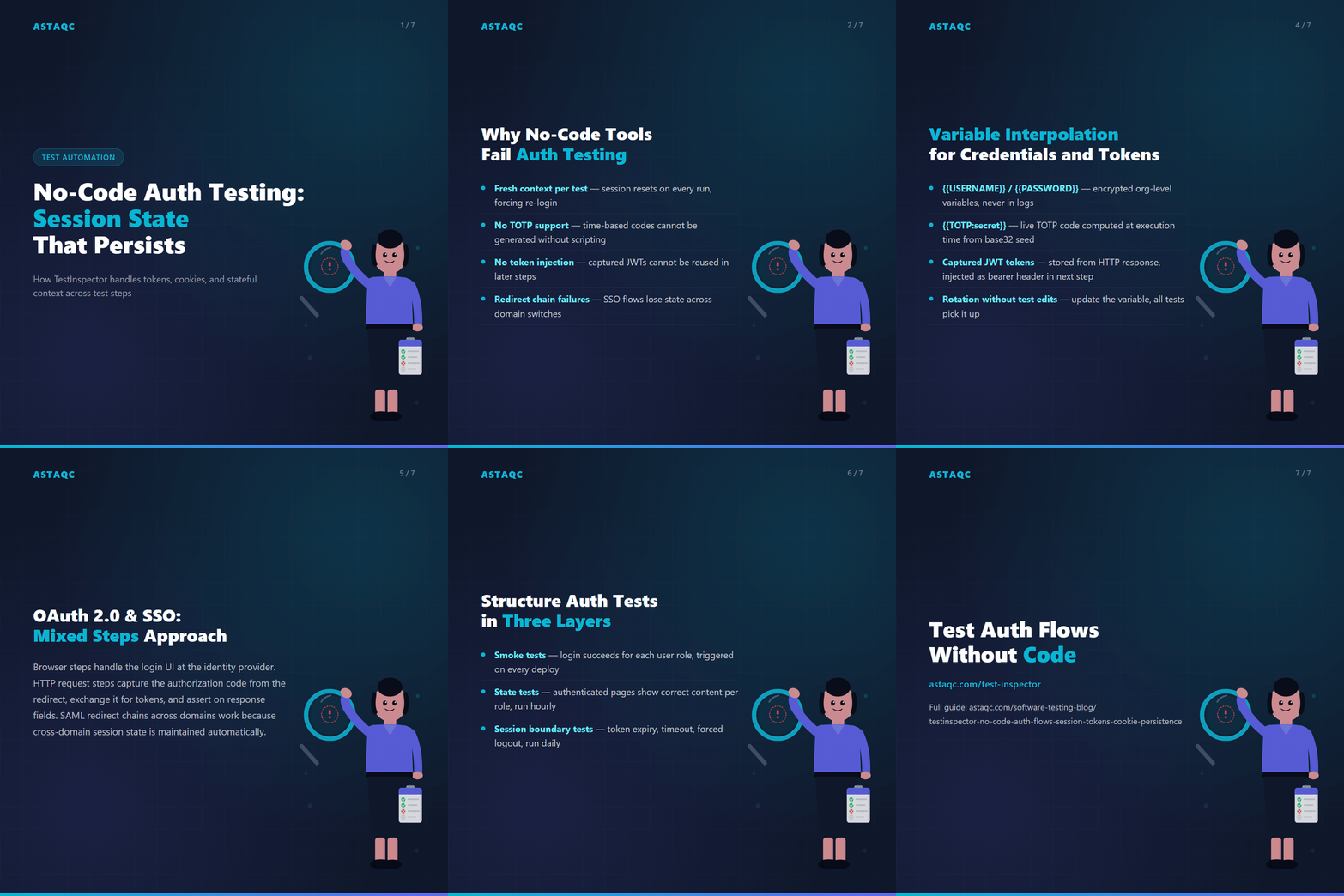
The second failure mode is more subtle. Login flows increasingly use TOTP-based two-factor authentication, JWT tokens that expire within minutes, or SSO flows that require redirect chains across multiple domains. A tool that can only click and type cannot handle TOTP generation, cannot store a token from one step and inject it as a header in the next, and cannot follow a redirect chain without losing session state.
TestInspector resolves both problems through two mechanisms: persistent browser context across steps within a test, and a variable system that allows tokens, cookies, and credentials to be stored and reused across steps without hardcoding them. Teams building this coverage can reference TestInspector and Astaqc’s test automation services.
Within a single TestInspector test, browser context — including cookies, session storage, and local storage — persists across every step. A login step at the beginning of a test creates a session, and all subsequent steps execute in that authenticated session without re-authenticating.
This means a QA engineer can build a test that logs in as a specific user in the first step, navigates to a protected resource in the second step, validates the page state in the third step, and logs out in the final step — with no intermediate re-authentication required. The session state accumulated at step 1 is available at step 10.
Test suites can be structured around user roles rather than page flows. One test covers the admin user journey from login through settings changes to logout. Another covers the standard user journey. Each test maintains its own session context without interfering with others when tests run in parallel, because each test instance runs in a separate browser context.
Session state does not persist between separate test runs by default. Each new test run starts with a clean browser context. For tests that need to verify behavior against a pre-authenticated state — such as testing behavior after a session token has aged past a threshold — TestInspector’s variable system allows a token captured in a previous step to be injected into a subsequent run through organization-level variables, which persist across runs until explicitly cleared.
| Authentication Approach | Session Persistence | TOTP Support | Token Injection |
|---|---|---|---|
| TestInspector stateful steps | Yes, within test run | Yes (TOTP:secret variable) | Yes, via variables |
| Fresh context per test case | No — resets on each run | No | No |
| Shared browser session across tests | Yes, but isolation-fragile | Depends on tool | Rarely supported |
TestInspector’s variable system makes authentication testing viable at scale without hardcoding credentials into test steps. The system supports three levels of variable scope — test, suite, and organization — with encrypted storage at all levels for sensitive values like passwords and API tokens.
For standard username and password authentication, credentials are stored as encrypted organization-level variables and referenced in form field inputs as {{USERNAME}} and {{PASSWORD}}. The variable values are never visible in run logs or step outputs, and they can be rotated without modifying any test.
For TOTP-based two-factor authentication, TestInspector provides a dedicated variable type: {{TOTP:secret}}, where secret is the base32-encoded TOTP seed. When the test step executes, TestInspector computes the current TOTP value using the stored secret and injects it into the input field. This handles the time-based nature of TOTP codes automatically — no external code or script is required.
For OAuth flows and JWT authentication, TestInspector’s HTTP request step captures the token from the response body and stores it in a variable. A subsequent browser step or HTTP step can then inject that token as a header value using the stored variable name. This covers testing APIs that accept bearer tokens independently from testing the UI that generates them.
The variable hierarchy means a token captured in one step is available to all subsequent steps in the same test. A token scoped to the suite level is available to all tests in that suite. An organization-level token is available to every test in the organization. Teams can combine variable interpolation with TestInspector’s scheduling to run authentication smoke tests on a cron schedule, catching token expiry or SSO configuration drift before it affects end users.
OAuth 2.0 and SSO flows involve redirect chains, token exchanges, and state parameters that are difficult to test through browser automation alone. TestInspector combines browser steps and HTTP request steps in a single test to handle the parts of the flow that require browser context and the parts that can be validated through direct API calls.
A typical OAuth 2.0 authorization code flow test in TestInspector works as follows: a browser step initiates the flow by navigating to the authorization URL, a browser step handles the login form at the identity provider, an HTTP request step captures the authorization code from the redirect URL, another HTTP request step exchanges the code for access and refresh tokens, and a final browser step uses the stored access token to access a protected resource. The HTTP request steps handle assertions on status codes and response body fields. If the token exchange fails, the test fails at that HTTP step with the exact status code and response body.
For SAML-based SSO, the flow is similar but requires browser steps at both the service provider and identity provider stages. TestInspector’s cross-domain session persistence handles the redirect chain between domains automatically.
A common mistake in authentication testing is building one large test that covers the entire auth flow from login to logout. This creates a test with many failure points and makes it difficult to isolate which part of the flow regressed when the test fails.
A more maintainable structure separates auth flow coverage into three test types. Smoke tests verify that the login flow succeeds for a representative user role — run on every deployment via the CI/CD trigger API. State tests verify that authenticated pages show the correct content for different roles — run as part of the regression suite, typically hourly. Session tests verify behavior at session boundaries: token expiry, session timeout, and forced logout — run on a daily schedule.
TestInspector’s scheduling feature supports this separation by allowing different tests to run at different intervals. Teams that want to review the broader testing picture can consult Astaqc’s QA team, testing documentation services, and the AI in software testing guide.
CAPTCHAs are designed to detect and block automated browsers. TestInspector does not bypass CAPTCHAs. The standard approach is to configure a testing environment where CAPTCHA is disabled for a specific test user account, or to use a bypass token that the application accepts for test environments. TestInspector tests against the configured test environment directly.
TestInspector executes each step in the browser session established at the start of the test. If the session expires mid-run due to a short session timeout, the test fails at the step that encounters the expiry, typically with a redirect to the login page. Structuring critical assertions early in the test flow ensures they execute before expiry for applications with short session timeouts.
Yes. TestInspector stores variable values as strings, and JWT tokens are stored as the raw base64url-encoded string. When injected into an HTTP request header, the value is used as-is without additional encoding. The variable system does not modify stored values, so tokens with dots, equals signs, and hyphens are stored and retrieved correctly.
Yes. A refresh token flow can be tested using two HTTP request steps: the first step exchanges the refresh token for a new access token and stores the result in a variable, and the second step uses the new token to access a protected resource. The refresh token itself is stored as an encrypted variable at the test or suite level.
TestInspector maintains session state across domains within a single test, so a redirect from app.example.com to tenant.example.com preserves cookies set at the main domain. For applications that use fully separate domains per tenant rather than subdomains, teams should verify that the application’s cookie Domain attribute configuration is consistent with how TestInspector routes the redirect chain.
Astaqc’s test automation services include auth flow implementation support. The manual vs automated testing guide covers when different test types apply. TestInspector documentation and QA team hire pages are available for teams at different stages of automation maturity.
Authentication testing in no-code tools fails when the tool cannot persist session state or generate time-based tokens. TestInspector’s variable system and stateful browser context address both without requiring custom scripts.
September 29, 2026


Sign up to receive and connect to our newsletter

We founded ASTAQC as a tight-knit group of professional Software Testers and software developers.
Subscribe to our Newsletter