October 21, 2026

TestInspector validates multi-condition assertions by letting QA engineers add multiple assertion types — HTTP status codes, response body values, DOM element states, screenshot comparisons, and accessibility checks — to a single test step through its chat interface, without writing code. Each assertion type is independently configured and evaluated, and the step fails if any single condition is not met, giving a precise failure signal rather than a generic test failed message. This approach catches application failures that single-assertion tests miss by design: a status 200 response that returns incorrect data, a DOM element that renders with the right text but wrong layout, or an accessible form that passes functional checks but fails WCAG contrast requirements.
Most automated tests make one assertion per step: check the HTTP status code, or check the element text, or check the screenshot. This pattern is fast to write and easy to read, but it systematically misses the class of failures where two conditions disagree. A payment confirmation endpoint can return HTTP 200 with a response body that contains an error flag. A navigation element can display the correct link text while its href points to a stale URL. A dashboard component can render the right data while failing a contrast check that makes it unreadable for users with low vision.
Single-assertion tests pass in all three of these cases. The HTTP check passes because the status code is correct. The DOM text check passes because the text is correct. The visual check passes because the layout looks identical to the baseline. The failures only appear when you combine the assertions: HTTP status AND response body, or DOM text AND DOM attribute, or visual match AND accessibility scan.
This is a structural problem with test design, not an edge case. Astaqc's test automation services page covers how assertion depth affects detection coverage in real test suites. The gap between what a test executes and what it actually validates is one of the most common sources of false confidence in automated coverage, as described in Astaqc's complete testing guide.
Multi-condition assertions address this by requiring that every relevant condition be validated in the same step. If the step passes, all conditions passed. If it fails, the test output names which condition failed, giving the QA engineer the precise failure signal without requiring a separate debugging step to narrow down the cause.
TestInspector's assertion model operates at the step level. A step can include assertions of different types simultaneously, and each assertion is evaluated independently against the same browser state captured at that point in the test run. The result for the step is the conjunction of all its assertions: pass if all conditions are met, fail with a named breakdown if any condition is not met.
In practice, a single TestInspector step can assert:
The chat interface generates the assertion configuration from a natural-language description. A test author can describe a step as after clicking Submit, assert that the response is 200, the confirmation message says Order placed, and the layout matches the baseline screenshot and TestInspector produces the corresponding step with all three assertions configured. The test author reviews the generated step, adjusts selector specifics or threshold values if needed, and saves it.
This is meaningfully different from adding multiple separate assertion steps. A separate assertion step for each condition requires the browser to be in the same state across all steps, which is only guaranteed for synchronous state. DOM assertions on the same element can be combined in one step without state-management overhead. Visual assertions capture the full viewport at the moment the step runs; splitting them across steps would require the browser to stay in the same visual state, which concurrent test execution or animation timing can violate. A single multi-condition step removes this class of timing sensitivity from the test design.
TestInspector's self-healing capability also applies at the step level. If a DOM element selector fails to resolve on a run, the AI selector suggestion identifies an alternative selector and logs it for the test author to review. This means multi-condition steps remain actionable when the UI changes — a single selector update repairs all assertions targeting that element, rather than requiring separate updates to separate assertion steps. Astaqc's software testing services page covers how this kind of low-maintenance assertion design reduces QA overhead as applications evolve.
The most common multi-condition assertion pattern in TestInspector is API-to-UI validation: verifying that an HTTP request returns the correct status and response body, then verifying that the UI correctly reflects the data from that response. This pattern catches the class of failures where the backend returns valid data but the frontend renders it incorrectly, or where the frontend renders the correct state visually but with accessibility problems that affect screen reader users.
A complete API-to-UI test step for a search results page, for example, would assert:
In a single-assertion test design, five separate steps would be required. The multi-condition step collapses these into one, with the added benefit that all assertions are evaluated against the same state: the page state immediately after the search API call completes and the DOM has updated. There is no window between steps where animation, polling, or background requests could change the page state and produce a misleading failure.
Variable interpolation in TestInspector works across assertion conditions within the same step. A step can use {{SEARCH_TERM}} in both the HTTP request body field and in the DOM text assertion, ensuring that the assertion validates the response for the specific test input rather than a hardcoded value. This is particularly valuable for tests that run against multiple environments: the same step configuration validates correctly against both staging and production URLs with environment-specific variable sets, as described in Astaqc's AI in software testing guide.
| Assertion Type | What It Catches | What It Misses Alone |
|---|---|---|
| HTTP status code | Server errors, routing failures, authentication failures | Incorrect response body with correct status |
| Response body assertion | Data accuracy, field presence, error flags in successful responses | UI rendering of that data |
| DOM text assertion | Correct data displayed, error messages, labels | Layout correctness, visual regression |
| Visual regression | Layout changes, style regressions, rendering issues | Data accuracy, accessibility |
| Accessibility assertion | WCAG violations, contrast, ARIA roles, focus management | Functional correctness, data accuracy |
The table above illustrates why each assertion type is necessary and insufficient on its own. Multi-condition assertions in TestInspector combine these checks in a single step, providing comprehensive validation without requiring a separate step per check type. Astaqc's manual testing page describes how manual exploratory testing complements automated multi-condition checks for scenarios where the exact failure mode is not yet known.
TestInspector's visual regression uses SSIM (Structural Similarity Index) to compare a screenshot of the current test run against an approved baseline image. SSIM measures structural similarity at the pixel level rather than requiring an exact match, which makes it tolerant of minor rendering differences like sub-pixel font smoothing variations while still catching meaningful layout changes like shifted components, truncated text, or missing elements.
The SSIM threshold is configurable per assertion. A threshold of 0.95 allows up to 5% structural difference before failing the assertion. For most UI components, 0.95 is a good default: it tolerates the rendering variation you would see across browser versions and operating systems while catching layout regressions. For pixel-sensitive comparisons like charts or rendered images, a higher threshold (0.98 or 0.99) reduces tolerance for structural differences. For pages with dynamic content like timestamps or user-specific data, exclusion masks crop or blank those regions before comparison so that dynamic content does not trigger false failures.
Within a multi-condition step, visual regression is evaluated after DOM assertions. This ordering matters: if a DOM assertion fails because a key element is missing, the visual regression may also fail (the element is absent from the screenshot), but the root cause is the DOM failure. TestInspector reports each failing condition independently, so the test output shows both failures and labels them separately. A reviewer can immediately identify that the DOM assertion failure is the root cause and that the visual regression failure is a consequence, rather than having to investigate two separate failures in isolation.
Baseline approval is a deliberate step in TestInspector. When a test runs for the first time, or after a UI change that the team intentionally introduces, the screenshot is presented for human review before being saved as the new baseline. This prevents a bad state from being silently adopted as the new baseline, which is a common failure mode in visual regression tools that auto-accept the first screenshot they capture. Once approved, the baseline is stored per test step, and subsequent runs compare against that approved state. Astaqc's TestInspector product page covers the baseline approval workflow and how it fits into a QA team's review process. Astaqc's software testing services page covers how visual regression integrates with functional testing in broader quality programs.
Exclusion masks and crop selectors can be applied at the step level. A step testing a dashboard with a live clock component can exclude the clock region from the SSIM comparison so that the time value does not cause the visual assertion to fail on every run. A step testing a page with a user-specific greeting can exclude the greeting region. These exclusions are stored with the step configuration, not managed separately from the assertion, which keeps the multi-condition step self-contained and readable in the test run log.
The following patterns represent the most effective uses of multi-condition assertions in TestInspector for common QA workflows. Each pattern combines assertion types that complement each other's gaps.
Checkout flow validation: Assert HTTP 200 on the order submission endpoint, assert response body contains status: confirmed and an order_id field, assert the confirmation page DOM displays the order ID, assert no critical accessibility violations on the confirmation page. This catches payment processing errors (API failures), data pass-through failures (confirmed status not rendered), and accessibility regressions in the confirmation flow.
Authentication state validation: After login, assert the session cookie is set (HTTP step with cookie assertion), assert the dashboard DOM contains the user's name from the test variable {{USER_NAME}}, assert the logout button is present, assert the screenshot matches the authenticated dashboard baseline. This catches authentication token failures, partial render failures, and layout regressions that appear only in authenticated sessions.
Form error handling: Submit a form with invalid data, assert HTTP 400 on the form submission endpoint, assert the DOM contains an error message element with the expected error text, assert the form fields retain their input values (the form was not reset on error), assert no critical accessibility violations on the error state. This pattern catches the class of failures where error handling is functionally present but not accessible.
API data freshness: Using an HTTP request step, call the data API and assert the response body contains a timestamp field within the expected window. Then assert the UI displays data matching the API response. This two-step pattern catches stale UI caches and CDN-served stale data that passes visual regression because the layout has not changed, only the data has aged. Astaqc's testing documentation page covers how to document multi-condition test step designs. Astaqc's manual vs. automated testing guide covers when each assertion type is better served by manual testing.
TestInspector supports both visual and DOM assertions in the same step. The DOM assertion evaluates element state in the live DOM, and the visual assertion captures a screenshot for SSIM comparison against the stored baseline. Both evaluations run at the same point in the test, against the same browser state. The step result is the conjunction of all configured assertions: if any single condition fails, the step fails, and the output names which conditions failed.
TestInspector reports each assertion condition independently in the test run log. If a step has three conditions and one fails, the output shows which condition failed — for example, DOM assertion failed: element #confirm-message not found — alongside the results of the other two conditions. The step itself is marked as failed. This per-condition reporting prevents the need for a separate debugging run to determine which assertion was the root cause, which is a significant time saving when diagnosing failures in steps with three or more conditions.
TestInspector supports exclusion masks on visual regression assertions. An exclusion mask defines a region of the screenshot that is blanked before SSIM comparison. For dynamic content — timestamps, user-specific names, live counters — the exclusion mask covers those regions so they do not affect the SSIM score. Exclusion regions are configured at the step level using either fixed pixel coordinates or element selectors, and they are stored with the step configuration so they are applied consistently on every run without manual setup before each execution.
Yes. TestInspector's assertion configuration is part of the no-code step design. The chat interface interprets natural-language descriptions of the desired assertions and generates the step configuration. A test author describes what the step should validate — HTTP status, DOM content, screenshot match, accessibility check — and the chat generates the step with all configured conditions. The test author reviews the selector specifics, threshold values, and exclusion regions in the step editor and adjusts if needed, but no code is written. The same workflow applies to recording steps with the browser extension and then adding assertion conditions through the editor.
TestInspector's self-healing applies to selector-based conditions within a multi-condition step. If a DOM assertion or accessibility assertion references an element by CSS selector or visible label, and that selector fails to resolve on a test run because the DOM structure changed, the AI selector suggestion identifies alternative selectors for the test author to review. All assertion conditions in the step that reference the same element can be updated in one edit, since they share the step's selector configuration. This means a single selector update repairs all multi-condition assertions targeting that element rather than requiring separate repairs per assertion type.
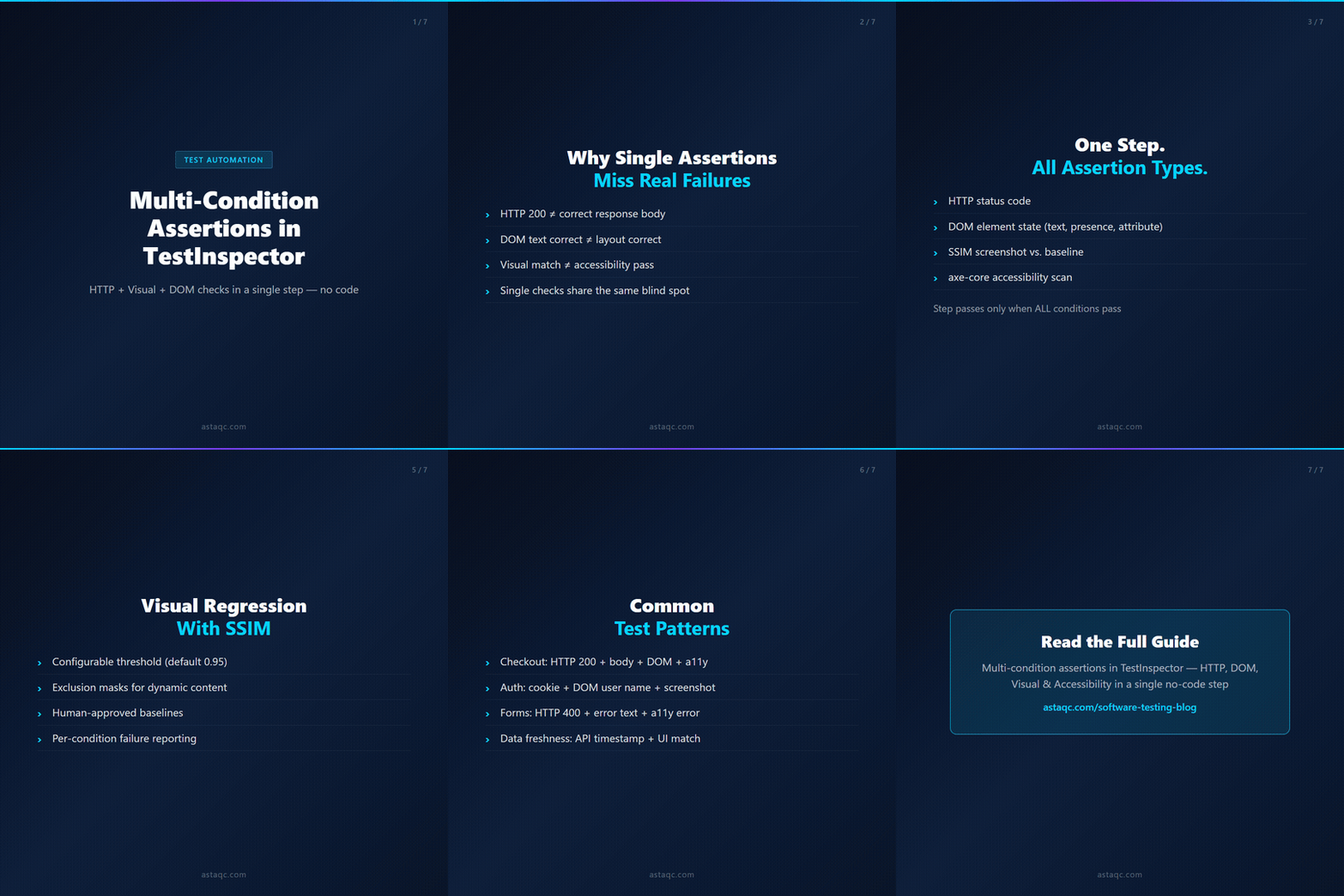
A test that checks status code but not response body passes bad data silently. A test that checks DOM text but not layout passes broken UI silently. Multi-condition assertions close both gaps in the same step.
October 21, 2026


Sign up to receive and connect to our newsletter

We founded ASTAQC as a tight-knit group of professional Software Testers and software developers.
Subscribe to our Newsletter