Testing Progressive Web Apps in 2026: Offline Mode, Service Workers, and App Shell Testing Without Code
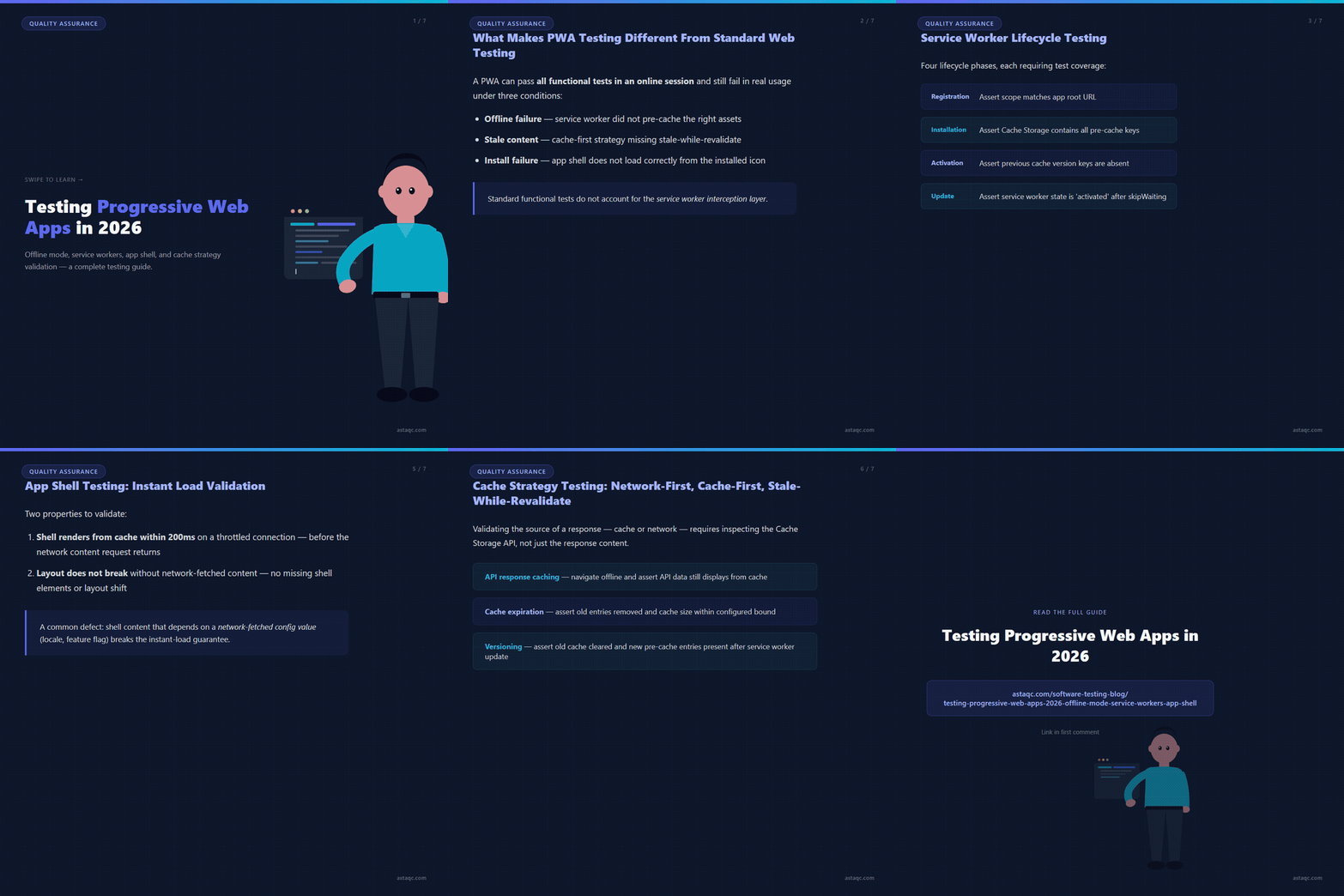
Progressive web apps present a testing surface that conventional web testing does not fully cover. A PWA's distinguishing capabilities — offline functionality, service worker interception of network requests, background sync, push notifications, and installable app shell — each require test scenarios that go beyond the standard click-and-assert model. In 2026, as more enterprise web applications adopt PWA patterns to improve reliability on intermittent connections and mobile devices, QA teams are encountering the gap between their existing functional test coverage and the behavioral requirements of a service-worker-enabled application.
This guide covers the specific testing challenges PWAs introduce, the test scenarios that catch the most common PWA defects in production, and how to structure PWA test coverage for offline mode, cache strategy validation, app shell rendering, and service worker lifecycle events using no-code testing tools. The approaches covered apply to any PWA built on frameworks like Next.js, Angular, or React with Workbox, as well as custom service worker implementations.
What Makes PWA Testing Different From Standard Web Testing
Standard web application testing validates behavior in an online, connected session where the browser makes direct network requests and the server returns fresh responses. This model covers the functional surface of most web apps accurately. PWA testing must additionally validate behavior when network requests are intercepted by a service worker, when responses are served from a cache rather than the network, and when the application must function without any network connectivity at all.
The service worker sits between the page and the network as a programmable proxy. When a PWA's service worker is active, every network request the page makes passes through the service worker's fetch event handler before it reaches the network. The service worker can serve the response from cache, fetch from the network and update the cache, return a custom offline fallback response, or apply any other strategy the developer has implemented. Standard functional tests that do not account for this interception layer will pass in online sessions but cannot verify that the service worker is applying the intended cache strategy or that the offline fallback is correct.
The practical consequence for QA is that a PWA can pass all functional tests in an online session and still fail in real usage under three conditions. First, offline failure: when the user loses connectivity, the service worker must serve cached content, but if the cache strategy did not pre-cache the right assets, critical routes return errors or the app shell fails to render. Second, stale content failure: a cache-first strategy that does not implement stale-while-revalidate correctly may serve outdated content indefinitely after the app is updated. Third, install failure: an app that installs to the home screen correctly in testing may fail to load the correct app shell on subsequent launches from the installed icon, particularly on iOS where PWA support differs from Chrome.
For teams building a testing strategy from scratch, the complete software testing guide covers how specialized test types like PWA testing integrate into an overall quality strategy. Teams looking to automate PWA testing alongside their standard functional coverage should plan for the additional infrastructure that offline simulation requires.
Service Worker Lifecycle Testing: Registration, Activation, and Update Flows
The service worker lifecycle has three phases that each require test coverage: registration (the service worker script is downloaded and parsed), installation (the service worker installs and pre-caches assets in the install event), and activation (the service worker takes control of the page and clears old caches in the activate event). Defects in any phase can prevent the PWA from functioning correctly, and lifecycle defects are among the hardest to catch in standard manual testing because they often manifest only on first visit, on update, or after a cache state change.
Registration testing verifies that the service worker script is registered at the correct scope, that registration succeeds without errors, and that the registered service worker's script URL matches the expected path. The test navigates to the application, waits for the service worker registration to complete, and then asserts on the service worker's state via the browser's Service Worker API. In TestInspector, this is implemented as a step that evaluates a browser script to check navigator.serviceWorker.ready and asserts the returned registration's scope and state.
Installation testing validates that the service worker's install event completes successfully and that the expected assets are pre-cached. The test checks the browser's Cache Storage API to verify that the named cache exists and that the pre-cached URLs are present. A common defect is a pre-cache list that includes a URL path that returns a 404, causing the entire install phase to fail and leaving the user without offline capability. The table below shows the most common service worker lifecycle defects and the test assertions that catch them.
| Lifecycle Phase | Common Defect | Test Assertion |
|---|---|---|
| Registration | Wrong scope: service worker only controls a sub-path, not the full app | Assert registration.scope matches the app root URL |
| Installation | Pre-cache failure: a 404 URL in the manifest causes install to abort | Assert Cache Storage contains all expected pre-cache keys |
| Activation | Old caches not cleared: stale assets served after app update | Assert previous cache version keys are absent after activation |
| Update | Update not propagated: waiting service worker never activates because page is not refreshed | Assert service worker state is 'activated' after skipWaiting trigger |
Update flow testing is particularly important for teams that deploy PWA updates frequently. When a new service worker is deployed, the browser detects the script change and installs the new version, but the new service worker enters a 'waiting' state rather than activating immediately, because the previous service worker is still controlling active pages. The app must trigger skipWaiting() to force the new service worker to activate. Testing the update flow verifies that the app correctly shows an update notification to the user, that clicking the update action triggers skipWaiting(), and that the page reloads with the new service worker controlling it. Without this test coverage, an update flow bug can leave users on stale PWA versions indefinitely.
Offline Mode Testing: Simulating Network Conditions and Validating Cache Fallbacks
Offline mode testing is the most direct validation of a PWA's core value proposition: that the application continues to function when connectivity is lost. The test must simulate the absence of network connectivity at the browser level, navigate to or interact with the application in that state, and assert that the application renders correctly from cache and that the user experience degrades gracefully rather than showing unhandled errors.
Browser-level network simulation is the correct method for offline testing because it intercepts all network traffic at the network interface layer, not just at the fetch API level. This means the simulation affects service worker fetch events, WebSocket connections, and background sync requests in the same way a real connectivity loss would. Tools that only intercept fetch requests at the page level do not test the full offline surface.
In TestInspector, offline mode simulation is implemented through the Chrome DevTools Protocol network emulation API. The test step sets the network condition to offline, then executes navigation and interaction steps, then restores the network condition at the end of the test. This approach correctly triggers the service worker's fetch event handler with network-failed requests, allowing the test to validate that the cache fallback strategy serves the correct response.
The core offline test scenarios that every PWA needs are: navigating to the app root while offline (the app shell must render from cache), navigating to a pre-cached route while offline (the route's content must render from cache), navigating to a non-cached route while offline (the app must show the custom offline fallback page, not a browser error), and submitting a form while offline (the form action must either queue via background sync or show a user-readable error, not silently fail). Each scenario is a separate test, and each requires a distinct assertion that verifies the correct offline behavior rather than just checking that the page did not crash.
For teams running manual testing alongside automated PWA coverage, manual offline testing is to use the browser's Network tab in DevTools to set offline mode, then navigate through the application's primary user flows. Any route that shows a browser-native error page (instead of the custom offline page) or that shows broken layout (because CSS or images are not cached) is a coverage gap in the service worker's cache strategy. These gaps should feed directly back into the pre-cache manifest and be verified with the automated offline test suite on the next build.

App Shell Testing: Validating Instant Load and Layout Integrity on Subsequent Visits
The app shell architecture is a PWA pattern where the application's outer chrome — the navigation, header, footer, and layout skeleton — is pre-cached and served from cache on every load, with dynamic content fetched from the network separately. The app shell's purpose is to deliver an instant-loading experience: the shell renders immediately from cache while content is fetched, eliminating the blank loading screen that standard web apps show on slow connections.
App shell testing validates two properties. First, that the shell renders correctly from cache on a subsequent visit: a performance test that throttles the network to simulate a slow connection, navigates to the app, and asserts that the shell elements are visible within a threshold time (typically under 200ms) while the network request for content is still in flight. Second, that the shell's layout does not break when rendered without network-fetched content: a visual regression test that captures the app shell in its loading state (content pending) and asserts that the layout skeleton is correct and that no shell elements are missing or mispositioned.
A common app shell defect is shell content that depends on a network-fetched configuration value — a user locale, a feature flag, or an API-provided navigation item — such that the shell cannot fully render until the network request completes. This breaks the instant-load guarantee and may cause layout shift when the network-dependent content loads. The test for this is to load the app shell from cache on a throttled connection and assert that all shell elements are present and in their final positions before the content area's network request returns.
Install-to-launch testing validates that the PWA's installed version loads the correct app shell. When a user installs a PWA to their home screen and subsequently launches from the installed icon, the browser loads the PWA from the start URL specified in the web app manifest, controlled by the service worker. The test asserts that the installed launch correctly loads the app shell from cache (not a browser navigation to the web URL), that the service worker controlling the installed app is the correct version, and that the app shell on first installed launch matches the shell on a standard browser visit. On iOS, this test is particularly important because Safari's PWA support has historically diverged from Chrome in ways that affect service worker behavior on launch.
See Astaqc's guide to outsourcing QA for how teams structure PWA test coverage alongside functional and performance testing when bringing in a specialist QA team. For teams running their own testing infrastructure, TestInspector provides the Chrome DevTools Protocol access needed for service worker state inspection and network condition simulation without requiring custom Playwright or Selenium setup.
Cache Strategy Testing: Validating Network-First, Cache-First, and Stale-While-Revalidate Behaviors
Workbox and custom service workers implement named cache strategies that determine how each type of network request is handled. Network-first strategy fetches from the network and falls back to cache on failure. Cache-first strategy serves from cache and only fetches from the network on a cache miss. Stale-while-revalidate serves from cache immediately while simultaneously fetching an updated version from the network to store for the next request. Each strategy has the correct use case and the wrong use case, and testing verifies that the right strategy is applied to each request type.
Cache strategy validation requires asserting on the source of a response — whether it was served from cache or the network — which is not visible in standard response content assertions. The correct method is to intercept the response headers for the x-cache header (if the CDN adds it) or to inspect the Cache Storage API state before and after a navigation. For Workbox-instrumented PWAs, the service worker emits a workbox-broadcast-update message when a cached response is updated, which the test can listen for as a confirmation that the stale-while-revalidate cycle completed.
API response caching tests validate that the correct API endpoints are covered by the runtime cache strategy. A PWA that caches its UI assets but not its API responses will show cached layout but empty or error content in offline mode. The test navigates to a page that fetches API data, switches to offline mode, navigates to the same page again, and asserts that the API data is still displayed from cache. The failing case is a page that shows the shell correctly but displays an empty content area or error state because the API response was not cached.
Cache expiration and versioning tests validate that the cache does not grow unboundedly and that cached assets are correctly invalidated when a new version is deployed. Workbox's cache expiration plugin sets a maximum number of entries or a maximum age for cached responses. The test for expiration loads enough entries to trigger the limit, then asserts that old entries are removed and the cache size is within the configured bound. The test for versioning simulates a deployment update by changing the service worker script, activates the new service worker, and asserts that the old cache version's entries are cleared and the new version's pre-cache entries are present.
Frequently Asked Questions
How do you test a PWA in offline mode without custom code?
TestInspector's network condition simulation step uses the Chrome DevTools Protocol to set the browser's network state to offline at the infrastructure level. The step is a no-code configuration in the test builder: select the network condition step, choose offline, and the subsequent steps in the test execute with no network connectivity. This correctly affects service worker fetch events, not just page-level fetch calls. Restore the network condition at the end of the test to avoid affecting subsequent steps.
What is the difference between testing a service worker and testing a PWA?
Service worker testing focuses on the service worker script itself: its registration scope, the events it handles, and the cache operations it performs. PWA testing is broader and includes the user-visible behaviors that the service worker enables: offline mode, app shell rendering, install flow, and update propagation. Service worker unit tests run in an isolated test environment (Vitest or Jest with a mock service worker runtime); PWA integration tests run in a real browser session with a live service worker controlling the page, because the interaction between the page, the browser, and the service worker cannot be accurately simulated in a mock environment.
How do you test the PWA install flow?
The install flow test verifies that the PWA meets all install criteria (served over HTTPS, valid web app manifest, registered service worker, icons of correct sizes) using Lighthouse's PWA audit in programmatic mode. The test runs the Lighthouse audit against the application URL and asserts that all PWA installability checks pass. Browser-level install simulation via DevTools is available for Chromium-based browsers and can be automated to verify that the beforeinstallprompt event fires and that the install prompt can be triggered programmatically in a test session.
Can you test push notifications in automated PWA tests?
Push notification permission and delivery can be tested in Chromium-based browsers by granting notification permission via the Chrome DevTools Protocol and then triggering a push event programmatically via the service worker's push event handler. The test verifies that the notification appears with the correct title, body, and icon, and that clicking the notification triggers the correct notificationclick handler behavior. This requires a test environment where the push subscription endpoint is controllable, which is typically done by running a local push notification service during the test run.
How does PWA testing integrate with CI/CD?
PWA tests run as part of the standard test suite on every build that modifies the service worker script, the web app manifest, or the pre-cache asset list. The offline mode and service worker lifecycle tests are integration tests that require a real browser, so they run in the same CI stage as other end-to-end tests. The Lighthouse PWA audit runs as a separate step after deployment to the staging environment, since it requires a served application rather than a localhost server. See Astaqc's test automation services for teams integrating PWA test coverage into an existing CI/CD pipeline, or AI-assisted testing approaches for teams exploring intelligent test generation for service worker coverage gaps.
A PWA that passes all functional tests in an online session can still fail silently in offline mode — service worker interception, cache strategy, and app shell rendering require dedicated test scenarios that standard functional tests do not cover.

Astaqc Team
November 20, 2026