October 11, 2026
TestInspector vs. Puppeteer: When AI-Native No-Code Testing Replaces Headless Browser Scripting
TestInspector and Puppeteer address the same problem — automated browser testing — from fundamentally different angles. Puppeteer is a JavaScript library that provides a programmatic API for controlling Chrome headlessly, requiring developers to write and maintain Node.js test scripts. TestInspector is an AI-native, no-code test automation platform where tests are defined as structured steps through a chat interface, run on Selenium-managed browsers across Chrome, Firefox, Edge, and Safari, and self-heal when selectors change. Teams choose Puppeteer when they need fine-grained headless browser control inside existing JavaScript infrastructure; teams choose TestInspector when they need QA coverage without embedding a scripting framework into the development workflow. The cost difference is not just setup time — it is the ongoing maintenance burden of a scripting-based test suite versus a managed platform.
Puppeteer, maintained by Google, gives Node.js developers direct access to the Chrome DevTools Protocol. It controls Chrome and Chromium headlessly or in headed mode, making it applicable to automated UI testing, web scraping, PDF generation, and screenshot capture. Puppeteer's API is low-level: you write JavaScript that navigates pages, waits for elements, fills forms, and asserts on DOM state. This gives developers complete control over every browser interaction and access to Chrome-specific APIs that higher-level testing frameworks abstract away.
Puppeteer tests follow the same structure as any Node.js script: install via npm, import the library, launch a browser instance, open a page, and interact. Teams without a dedicated QA function that already work in Node.js typically try Puppeteer first because there is no separate tool to learn — it integrates directly with the existing codebase, existing test runners like Jest or Mocha, and existing CI/CD pipelines that already run Node.js commands.
The practical limitation is that Puppeteer provides the raw browser API and nothing more. Selector management, retry logic, parallelization, test reporting, and scheduling are all the team's responsibility. A Puppeteer-based test suite that remains maintainable at scale requires a framework layer on top — typically Playwright (which shares architectural lineage with Puppeteer), or a testing wrapper like jest-puppeteer — along with custom utilities for waiting for network idle, handling authentication flows, and managing test data. The infrastructure investment is real: teams building serious end-to-end coverage with Puppeteer are effectively building a testing framework in addition to writing tests. Astaqc's test automation services include evaluation of script-based frameworks against the team's actual maintenance capacity to identify when the framework overhead outweighs the control benefits. The manual vs. automated testing guide covers the broader decision of where automation investment pays off and where it does not.
TestInspector is an AI-native test automation platform that generates and runs browser tests without requiring test scripts. Tests are authored through an AI chat interface as structured steps — plain-language instructions the system converts to a sequence of actions (navigate, click, fill, assert, wait) that run on real browsers. The generated steps are transparent and editable in the TestInspector interface, so teams can review exactly what the test does without reading code.
The self-healing capability distinguishes TestInspector from raw scripting tools: when a selector breaks because a developer changed a CSS class, added an ID, or restructured the DOM, TestInspector's AI attempts alternative selectors and reports the recovery strategy in the run log rather than failing the test silently. For teams maintaining large suites where selector drift is a continuous maintenance cost, self-healing directly reduces the overhead that makes UI test suites expensive to keep current.
Additional capabilities include: variable interpolation with {{VAR}}, {{TIMESTAMP}}, {{TOTP:secret}}, and {{ALPHANUMERIC}} for parameterized test data with test, suite, and org-level scoping and encrypted storage for secrets; visual regression comparison via SSIM screenshot diff with baseline approval and per-element exclusion selectors; accessibility assertions using axe-core at configurable severity levels; HTTP request steps for API testing (GET, POST, PUT, PATCH, DELETE with status code and body assertions) without leaving the platform; and scheduling via cron, interval, or one-time triggers with live WebSocket run streaming.
TestInspector also provides a CI/CD trigger API and MCP tokens for use with Claude Code, Cursor, and Claude Desktop — enabling AI coding agents to generate and run tests as part of an automated development workflow. The browser extension records user interactions and converts them into structured TestInspector steps, providing a familiar recording-based starting point for teams transitioning from manual testing. Astaqc's software testing services include TestInspector onboarding and test suite migration for teams moving from Puppeteer or Selenium to a managed no-code platform. See the TestInspector product page for the full feature set and getting-started resources.
The comparison below covers the dimensions that determine total cost of ownership for a browser testing setup, not just feature parity on individual capabilities.
| Dimension | TestInspector | Puppeteer |
|---|---|---|
| Test authoring | AI chat interface generates structured steps | JavaScript/Node.js scripts |
| Languages required | None | JavaScript or TypeScript |
| Cross-browser support | Chrome, Firefox, Edge, Safari | Chrome/Chromium; Firefox experimental |
| Self-healing selectors | Built-in AI selector recovery | Manual — requires explicit retry logic |
| Visual regression | SSIM screenshot comparison, built-in | Requires custom implementation or plugin |
| Accessibility testing | axe-core assertions, configurable severity | Requires separate axe-puppeteer setup |
| Scheduling | Cron, interval, one-time — built-in | External scheduler required |
| AI agent / MCP support | MCP tokens for Claude Code, Cursor | No native MCP integration |
| Variable management | Built-in with encrypted storage and scoping | Manual via environment variables or fixtures |
| Infrastructure ownership | Managed SaaS platform | Team owns all framework and infrastructure |
The infrastructure ownership row captures the most important cost difference. Astaqc's hire QA team services can supplement TestInspector with test design and coverage strategy when the team needs QA expertise alongside the tool. The complete software testing guide covers how tool selection fits into a broader testing strategy.
Puppeteer is the right choice when the team writes JavaScript and needs direct integration with an existing test runner and codebase; when the use case extends beyond UI testing to PDF generation, web scraping, or custom browser automation that does not fit a testing tool's workflow; when the team is incrementally migrating from Puppeteer to Playwright while keeping the same scripting paradigm; or when an existing mature Puppeteer framework already covers the team's scope and rewriting it provides no measurable benefit.
Puppeteer also makes sense when the tests themselves are the product — a team that sells browser automation services or builds test infrastructure tooling for other teams needs the full API surface of the Chrome DevTools Protocol. In these cases, the framework overhead is the feature, not a cost.
TestInspector is the right choice when QA engineers, product managers, or non-developer team members need to write and maintain tests without learning JavaScript; when the team's recurring test maintenance cost is selector updates rather than script complexity; when the test suite needs to run across Chrome, Firefox, Edge, and Safari without managing a browser grid; when visual regression, accessibility assertions, API testing, and scheduling are needed in a single tool; or when the team uses AI coding tools like Claude Code or Cursor and wants tests generated and run programmatically as part of that workflow.
The decision often comes down to who owns the tests. If test maintenance is the responsibility of developers who already write JavaScript, Puppeteer or Playwright fits the existing workflow. If test maintenance is the responsibility of QA engineers or other non-developer roles, or if developer time spent on test maintenance is consistently crowded out by feature work, TestInspector's no-code model removes the bottleneck. Astaqc's manual testing services can cover the exploratory testing scenarios that no-code automated tools do not address. The guide to outsourcing QA covers structuring the division between in-house automation and external QA capacity.
TestInspector exports tests to Playwright TypeScript, Selenium IDE (.side format), and Gherkin BDD format. There is no direct Puppeteer export because Puppeteer does not have a standardized test file format. The Playwright TypeScript export covers the same browser automation scenarios and runs without modification in a standard Playwright project.
Puppeteer supports Chrome and Chromium natively, with Firefox support available via a separate package in later versions. It does not support Safari or Edge in the same way Playwright does. Teams that need consistent cross-browser coverage across all major browsers typically choose Playwright over Puppeteer. TestInspector runs on Chrome, Firefox, Edge, and Safari via its managed browser execution layer without requiring browser installations or configuration.
Puppeteer is actively maintained and not deprecated. Playwright, developed by former Puppeteer engineers at Microsoft, has become the more common choice for automated UI testing because it provides built-in cross-browser support, test fixture management, and a more complete testing experience out of the box. Puppeteer retains a strong position for non-testing browser automation use cases such as scraping, PDF generation, and browser orchestration pipelines.
When TestInspector encounters a failing selector during a run, the self-healing engine attempts alternative locator strategies — different attribute combinations, text-based locators, ARIA role selectors — and records the attempted strategies in the run log. If an alternative succeeds, the run continues and the log reports which selector was used. If no alternative succeeds, the run fails and the log identifies the step and the last attempted selectors, giving the team actionable diagnostic output. The AI selector suggestion feature presents updated locator options in the interface so the step can be corrected with a single click.
A first working Puppeteer test from scratch takes a JavaScript-familiar developer about 20 to 30 minutes. A first working TestInspector test takes roughly 5 to 10 minutes: create an account, describe the test scenario in the AI chat interface, review the generated steps, and run. The gap widens when the team adds cross-browser support, scheduling, visual regression, and CI/CD integration — each requiring additional configuration in Puppeteer and each included in TestInspector. See TestInspector for the full feature set and trial access.
TestInspector's HTTP request steps handle API interactions and webhook validation without JavaScript. For UI scenarios that require direct DOM manipulation or arbitrary JavaScript execution mid-flow, teams typically run those tests in Playwright and use TestInspector for the broader suite where no-code authoring provides coverage without scripting overhead. The two tools are not mutually exclusive; many teams run both in parallel, with Playwright handling complex programmatic scenarios and TestInspector handling the majority of functional coverage.
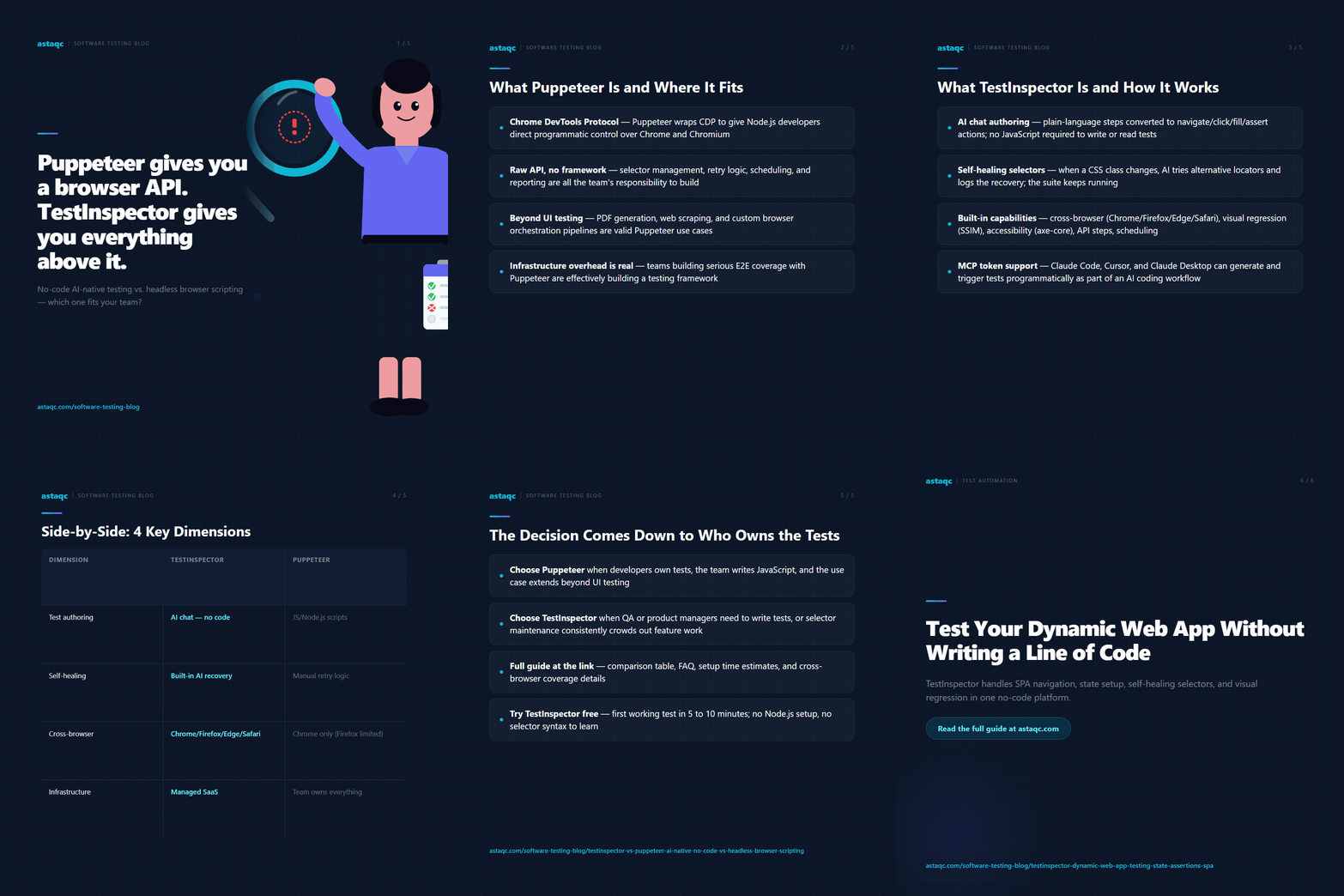
The choice between TestInspector and Puppeteer is a choice between building a testing framework and using one. Puppeteer provides the raw browser API; TestInspector provides the execution engine, self-healing, scheduling, and visual regression that teams otherwise build themselves.
October 11, 2026


Sign up to receive and connect to our newsletter

We founded ASTAQC as a tight-knit group of professional Software Testers and software developers.
Subscribe to our Newsletter