How TestInspector Tests Subscription and Recurring Payment Flows: Webhook Validation, Status Transitions, and Trial Period Assertions Without Code
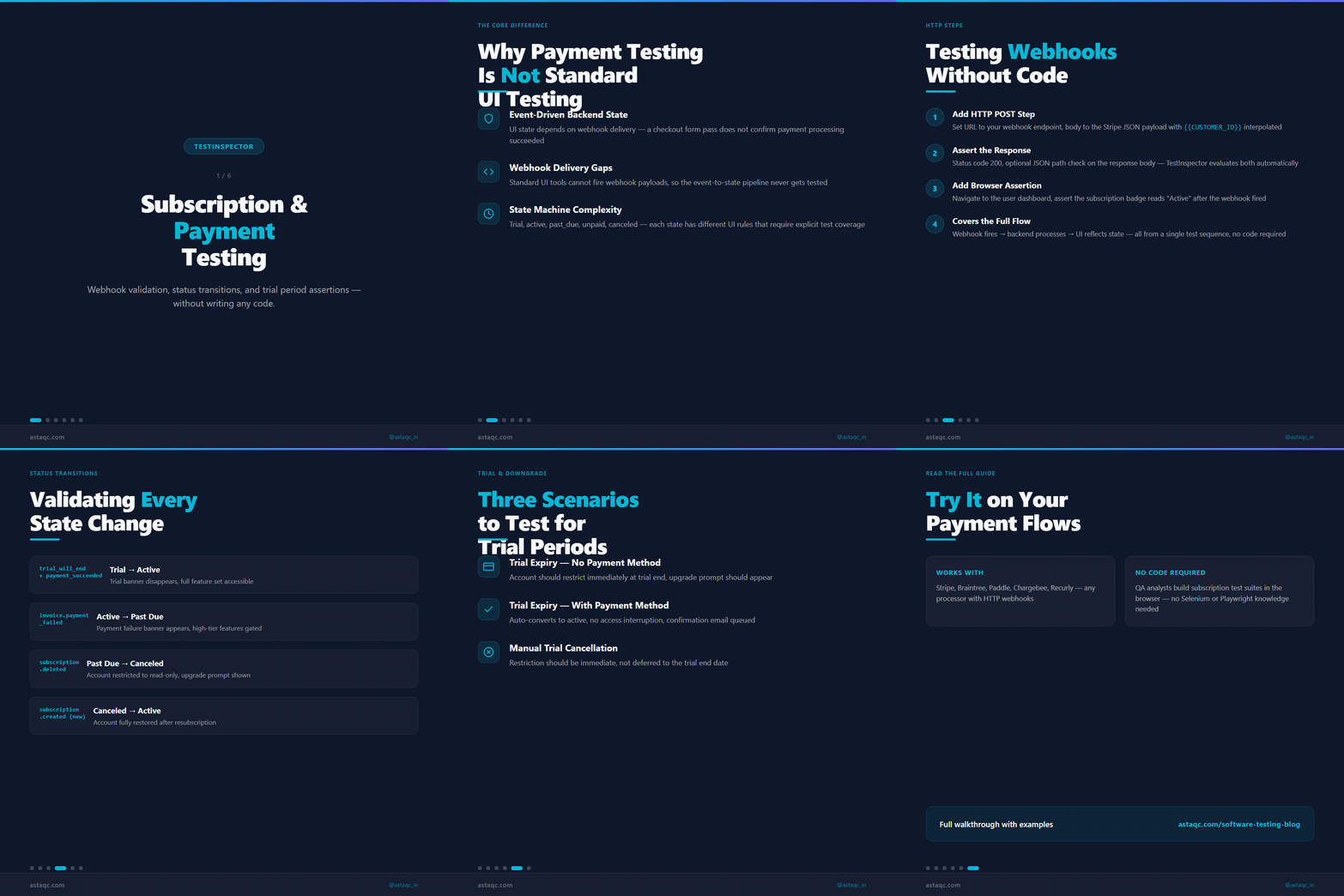
Subscription payment flows involve multiple systems working together: a payment processor fires a webhook event, your backend updates a subscription record, your frontend reflects the new state, and your email system sends a confirmation. Testing all of this without a code-based framework has historically required either manual verification or significant automation investment. TestInspector handles this through HTTP request steps that send and validate webhook payloads directly, combined with browser-based assertions that confirm UI state after each payment event.
This guide explains how to build subscription payment tests in TestInspector without writing code: from webhook validation and status transition testing to trial period assertions and downgrade flow coverage.
Why Subscription Payment Testing Differs from Standard UI Testing
Standard UI testing validates that buttons, forms, and pages render correctly. Subscription payment testing adds a layer that most UI tools are not designed for: event-driven backend flows where the UI state depends on external webhook delivery.
A Stripe subscription works like this: the user completes checkout, Stripe sends a customer.subscription.created webhook to your backend, your backend provisions the account, and only then does the user's dashboard reflect the upgraded state. A test that only clicks through the checkout form and asserts the resulting page validates the happy path but misses webhook processing, the backend state transition, and edge cases where the webhook arrives out of sequence.
TestInspector addresses this with HTTP request steps that run server-side HTTP calls within a test sequence. These steps can fire webhook payloads to your endpoint, assert the HTTP response code, check the JSON response body, and then continue with browser steps that validate the UI state. This gives you end-to-end coverage of the full payment flow from a single test definition.
Testing Webhook Events with TestInspector HTTP Steps
TestInspector HTTP request steps support GET, POST, PUT, PATCH, and DELETE. For webhook testing, you use POST steps that send the exact webhook payload your payment processor would send.
The workflow for a Stripe subscription webhook test: create an HTTP step with method POST and your webhook endpoint URL, set the request body to the JSON structure Stripe sends for a customer.subscription.created event using variable interpolation for the customer ID ({{CUSTOMER_ID}}), set an assertion on the response (status code 200 and optionally a JSON path assertion), then add a browser step that navigates to the user dashboard and asserts the subscription status badge reads "Active".
This covers the complete flow: the webhook fires, your backend processes it, and the UI reflects the result. If any step fails—the webhook returns a 500, the status badge still reads "Trial", or the navigation 404s—the test stops and reports which step failed. For payment failure events such as invoice.payment_failed, the same pattern applies with a different payload and different UI assertion: the dashboard should show a payment failure banner and an "Update Payment Method" prompt.
Validating Subscription Status Transitions
Subscription state machines are where most billing bugs hide. The states are typically: trial, active, past_due, unpaid, and canceled. Each transition has associated webhook events, and each state has associated UI rules determining which features are enabled, which prompts are displayed, and which API calls succeed.
A complete status transition test suite with TestInspector covers these flows:
- Trial to active: Fire
customer.subscription.trial_will_endtheninvoice.payment_succeeded. Assert the trial banner disappears and the full feature set is accessible. - Active to past_due: Fire
invoice.payment_failed. Assert the payment failure banner appears and high-tier features are gated. - Past_due to canceled: Fire
customer.subscription.deleted. Assert the account is restricted to read-only mode. - Canceled to active (resubscription): Fire
customer.subscription.createdagain. Assert the account is fully restored.
Each flow is a sequence of HTTP steps followed by browser assertions in TestInspector. Variable interpolation handles test data: {{SUBSCRIPTION_ID}} and {{CUSTOMER_EMAIL}} are defined at the suite level and substituted into every step, so the same test definition works against any test subscription. TestInspector's self-healing automation helps when billing UI selectors change after a redesign. If the payment failure banner's CSS selector changes, TestInspector's AI selector suggestions identify the new selector automatically, preventing the status transition tests from breaking with every frontend deploy.
Trial Period and Downgrade Flow Testing
Trial period testing covers three distinct scenarios: trial expiry without a payment method (account should restrict), trial expiry with a payment method (should auto-convert), and manual trial cancellation (should immediately restrict).
For downgrade flows, you need to validate both the UI prompt path and the backend state. TestInspector handles the UI path with browser steps: navigate to billing settings, click the downgrade button, assert the confirmation modal appears, confirm the downgrade, and assert the new plan is reflected. The HTTP step layer handles the webhook: after the browser steps complete, an HTTP step fires a customer.subscription.updated webhook with the new plan details and asserts the backend processes it successfully. For applications with Stripe CLI or Braintree sandbox access, use TestInspector's HTTP steps to replay those test events directly, bypassing the need to trigger them through UI actions. This is faster and more reliable than UI-driven payment flows in test environments.

TestInspector vs. Code-Based Subscription Testing Approaches
| Dimension | TestInspector | Selenium + Custom Framework |
|---|---|---|
| Webhook simulation | HTTP steps, no code required | Custom HTTP client code and test fixtures |
| Variable handling | Built-in interpolation with encrypted storage | Test fixture scaffolding and secrets management |
| Self-healing selectors | Automatic with AI suggestions | Manual selector maintenance on UI changes |
| Cross-browser support | Chrome, Firefox, Edge, Safari included | Requires Selenium Grid or cloud browser setup |
| CI/CD integration | API trigger, cron scheduling, CI webhook | Framework-specific CI configuration required |
| Flaky test recovery | Auto-retry with AI selector suggestions | Retry loops written in framework code |
Teams switching from Selenium-based webhook testing to TestInspector typically reduce test maintenance by eliminating the custom HTTP client wrapper code and the fixture scaffolding needed to manage test subscription IDs and authentication tokens. For more context on test automation services that include payment flow coverage, or if you need a team to implement subscription testing, see Astaqc's QA team services.
Frequently Asked Questions
Can TestInspector test Stripe webhooks without a Stripe account?
You can test your webhook handler endpoint directly using TestInspector HTTP steps without a Stripe account. Send the same JSON payload structure that Stripe sends, and your backend processes it identically. For tests that require Stripe signature verification, set up the HMAC value using TestInspector's variable interpolation with the webhook secret stored as an encrypted variable: {{STRIPE_WEBHOOK_SECRET}}. This lets you fire valid signed webhooks from TestInspector without touching Stripe's dashboard.
How do I handle subscription tests that depend on a specific test user state?
Use TestInspector's suite-level variables to set up test user IDs, subscription IDs, and customer tokens shared across all steps in the test. Store sensitive values such as API keys as encrypted variables using TestInspector's encrypted storage. Set up the test state via HTTP steps at the beginning of the test sequence (create a subscription via the test API, store its ID in a variable) and tear it down at the end (cancel the subscription).
What payment processors work with TestInspector HTTP steps?
Any payment processor that accepts webhook payloads over HTTP works with TestInspector's HTTP request steps. This includes Stripe, Braintree, PayPal, Paddle, Chargebee, Recurly, and any in-house billing system. The steps accept arbitrary JSON bodies, custom headers, and any HTTP method, matching whatever your payment processor sends.
How does TestInspector handle test environments vs. production for billing tests?
Use TestInspector's environment variables to swap the webhook endpoint URL and authentication tokens between environments. Define {{WEBHOOK_ENDPOINT_URL}} as an org-level variable with different values per environment. The same test definition runs against staging (test events against your staging webhook URL) and production health checks (GET assertions against billing API status endpoints).
Does TestInspector integrate with CI/CD pipelines for subscription test automation?
TestInspector provides an API trigger that your CI pipeline calls to run scheduled or on-demand test suites. Set up a webhook in your CI pipeline (GitHub Actions, GitLab CI, Jenkins) to fire the TestInspector API trigger after each deployment. TestInspector streams run results and returns a pass/fail status code that your CI pipeline uses as a quality gate. For background on how TestInspector fits into automated testing workflows, see the complete guide to software testing and Astaqc's testing services.
"Testing subscription payment flows requires webhook simulation, state transition validation, and UI assertions working together—not just checking if the checkout button works."
Avanish Pandey
November 14, 2026