October 11, 2026
How TestInspector Tests Dynamic Web Applications: State-Dependent Assertions, DOM Change Detection, and SPA Testing Without Code
TestInspector tests dynamic web applications by executing structured steps that interact with live browser state — clicking elements, waiting for conditions, capturing values, and asserting against the resulting DOM — without requiring any test code to be written. Each step runs via Selenium on Chrome, Firefox, Edge, or Safari, with AI-powered self-healing to recover from selector changes automatically. SPA testing, state-dependent flows, and applications that render content asynchronously are all supported through the same no-code interface that handles static page tests. Astaqc's test automation services include dynamic web application testing as part of coverage strategy for teams moving from traditional frameworks to AI-native tools. The complete software testing guide covers dynamic application testing strategies as part of modern QA fundamentals.
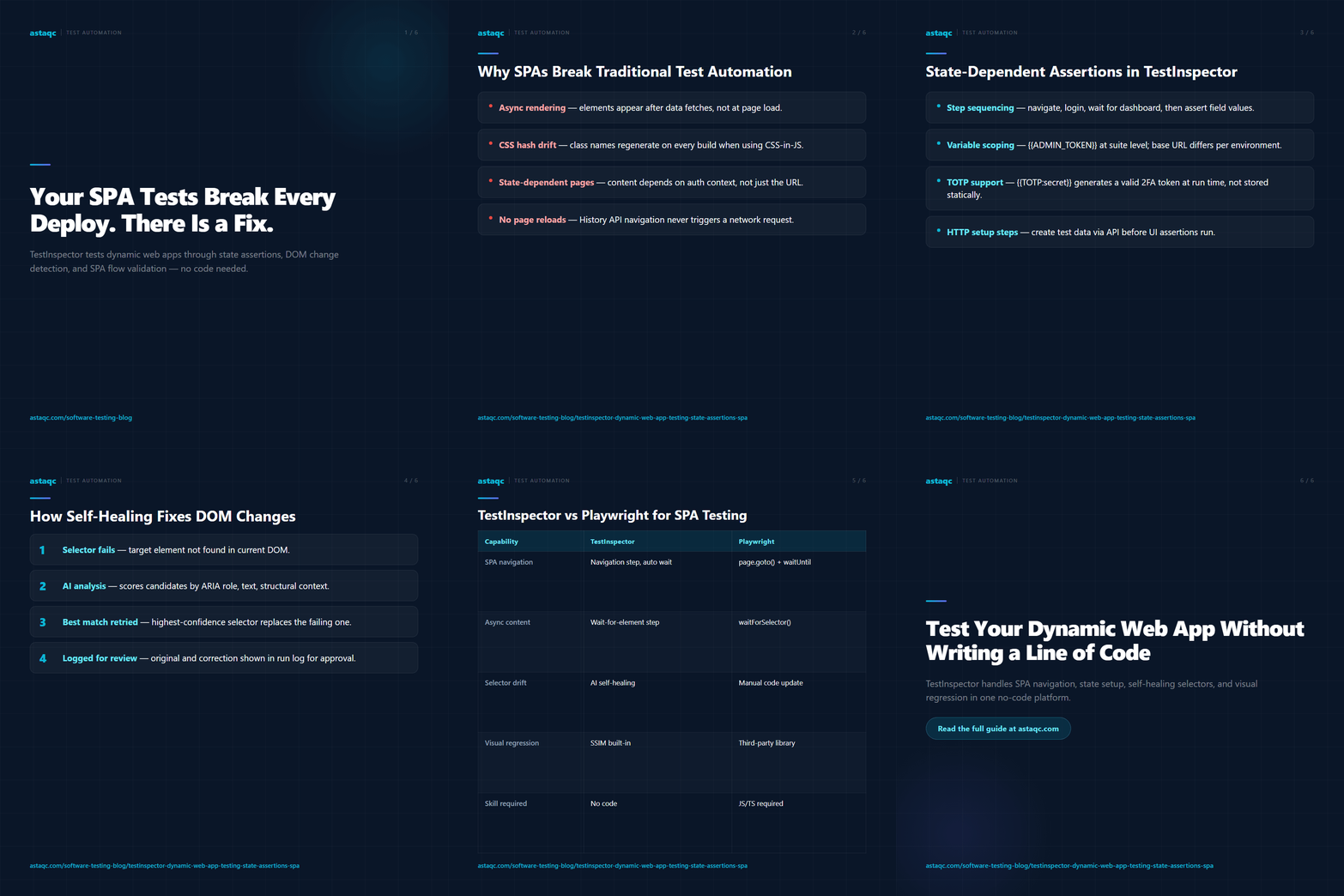
Dynamic web applications break traditional test automation because they violate the assumptions most test frameworks are built on. Traditional Selenium-based frameworks assume that elements exist in the DOM at the time the test runs, that element attributes are stable across deploys, and that page state is predictable from URL alone. Modern SPAs built on React, Vue, Angular, and similar frameworks violate all three assumptions. Elements render asynchronously after data fetching completes. CSS class names and element IDs change when component libraries update or when CSS-in-JS libraries regenerate hashes. Page state depends on application-level state, authentication context, and previous user interaction — not just on the URL loaded.
The consequence is selector brittleness. A test that locates an element by its CSS class name fails after the next build if that class name was regenerated by the bundler. A test that asserts on element text fails if the text depends on API data that returned a different value in the test environment. A test that clicks a button that appears after a 200ms API call fails unless the test includes an explicit wait condition for that element's appearance. Code-first frameworks provide the building blocks to handle these cases — explicit waits, dynamic locators, page objects with stable accessor methods — but each solution requires framework expertise, debugging capability, and ongoing maintenance when the application changes.
TestInspector addresses this at the framework level rather than the step level. Self-healing means that when a selector stops matching the expected element, the AI component analyzes the current DOM, identifies the most likely matching element based on structural context and visible text, and proposes a corrected selector before the test fails silently or errors with a cryptic locator exception. The run log shows both the original selector and the AI-proposed correction so the engineer can approve or modify the suggestion. For QA teams that maintain test suites on fast-moving frontends, this reduces the primary maintenance burden without requiring code changes to test files.
State-dependent assertions in TestInspector work through explicit step sequencing. A test that validates a user's dashboard after login does not assume the dashboard state — it navigates to login, enters credentials via variable interpolation ({{USERNAME}} and {{PASSWORD}}), submits the form, waits for the dashboard element to appear, and then asserts on specific field values. Each step either passes or fails based on the actual browser state at execution time, with the full step trace available in the WebSocket-streamed run log.
Variable scoping makes state-dependent tests maintainable at scale. Variables can be defined at the test level, suite level, or organization level, with the narrowest scope taking precedence. A test that requires a user authenticated as an admin uses {{ADMIN_TOKEN}} stored at the suite level with organization-level defaults for the base URL. The same test running against staging and production environments reads different base URL values without requiring test content changes. TOTP tokens for two-factor authentication use {{TOTP:secret}} syntax, which generates a time-based one-time password from the stored secret at test execution time — the test never stores a static token that expires.
For applications where state depends on previous test steps — a checkout flow that requires items in the cart, a user management test that requires a specific user to exist — TestInspector supports sequential steps that build the required state within the same test execution. An HTTP request step can call the application's API to create a test user before the UI flow that validates user management. A navigation step can add items to the cart via direct URL before the checkout flow steps begin. The assertion that validates the checkout confirmation asserts against the specific items added in the setup steps. This approach uses the application's own state-building mechanisms rather than requiring database access or mock injection, which means the test validates a flow that mirrors actual user behavior rather than a shortcut path that bypasses application logic. Astaqc's software testing services include state-dependent test design as part of QA strategy for teams with complex authentication and data-setup requirements. The manual vs. automated testing guide covers when state-building automation provides more value than manual test data setup.
TestInspector's self-healing mechanism is the primary answer to DOM change detection in frameworks without stable element identifiers. When a step runs and the target element is not found at the expected selector, the AI component performs a DOM analysis that considers the element's text content, surrounding structural context, ARIA attributes, and element type. It generates a corrected selector targeting the element that best matches the original's characteristics in the current DOM and presents it in the run log as a suggestion the engineer can approve, modify, or reject.
For applications that use semantic HTML with stable ARIA roles, data-testid attributes, or visible text that does not change with deploys, self-healing rarely triggers because the selectors the browser extension records are inherently stable. The highest value of self-healing is in applications built with CSS-in-JS (styled-components, Emotion, CSS Modules with hash-appended class names) or with component library updates that reorganize the DOM structure. In those cases, a deploy that the test recorder would have produced a breaking change for instead produces a self-healing suggestion that the engineer reviews in the next run.
Beyond selector changes, dynamic DOM content requires visual regression validation. TestInspector's SSIM screenshot comparison captures a baseline screenshot of the target element or page region during an approved run, then compares subsequent run screenshots against the baseline using structural similarity scoring. Deviations above the configured threshold flag the run for review with a side-by-side comparison of the baseline and the failing screenshot. Exclusion selectors let engineers mark regions that are expected to change — timestamps, user-specific data, dynamic counters — so those regions do not generate false visual regression failures. The combination of AI selector self-healing and SSIM visual regression gives dynamic web application tests two complementary layers of change detection: one that catches structural DOM changes that would break interactions, and one that catches rendered output changes that would break user experience. TestInspector's full feature set for dynamic app testing is described at TestInspector. Astaqc's performance testing services complement UI testing with load and response time validation for dynamic applications under realistic traffic conditions.
Single-page applications require test tools that understand browser-side navigation — URL changes that happen through the History API without a full page reload, content that renders based on application state rather than server-delivered HTML, and transitions that complete asynchronously after client-side logic executes. TestInspector handles SPA navigation naturally because it drives the browser directly via Selenium rather than simulating HTTP requests. A navigation step to a SPA route loads the URL in the real browser, triggers the application's route handler, and waits for the content rendered by that route to appear before the next step executes.
Wait conditions in SPA test steps prevent the assertion-before-render failures that cause most SPA test instability. TestInspector supports waiting for an element to appear, waiting for an element's text to match a pattern, and waiting for an element's visibility state to change. These conditions pause step execution until the SPA has finished its asynchronous rendering before the subsequent assertion or interaction runs. Timeout thresholds are configurable per step so that steps expected to complete quickly fail fast on regressions without blocking the full suite on a slow single step.
| Capability | TestInspector (No-Code) | Playwright (Code-First) |
|---|---|---|
| SPA route navigation | Navigation step with automatic wait | page.goto() with waitUntil option |
| Async content wait | Wait-for-element step, configurable timeout | waitForSelector(), waitForResponse() |
| Selector drift handling | AI self-healing with suggestion log | Manual selector updates in code |
| Visual regression | SSIM screenshot comparison built-in | Requires third-party library integration |
| Cross-browser execution | Chrome, Firefox, Edge, Safari | Chromium, Firefox, WebKit |
| CI/CD integration | API trigger, cron scheduling | npm test in CI pipeline |
| Skill required | No programming knowledge needed | JavaScript/TypeScript required |
Multi-step SPA flows that cross route boundaries — onboarding sequences, checkout funnels, multi-page form submissions — work as sequential test steps within a single test or suite. Variable interpolation captures values from one route (a generated order ID, a user token from an API response) and uses them in subsequent steps (navigating to the order detail route, asserting on the order status). The HTTP request step type handles the API calls that many SPA flows depend on — fetching user data, submitting form payloads, validating webhook receipt — with status code and response body assertions that catch API regressions that the UI layer would not surface visibly. Astaqc's hire QA team services provide engineers experienced with SPA testing patterns using both code-first and no-code tools. The AI in software testing guide covers how AI-native tools change the economics of SPA test maintenance compared to code-first frameworks.
Yes. TestInspector drives a real browser via Selenium, so it interacts with the rendered DOM after all client-side JavaScript has executed — including frameworks that deliver a minimal HTML shell and populate the page content entirely via JavaScript. The test steps run against what the browser renders, not against the raw server response. This means CSR, SSR, and SSG applications are tested identically from TestInspector's perspective — the tool does not distinguish between rendering strategies and tests the actual page state the user sees.
Variable interpolation handles role-based content variation. Tests that target admin-specific UI elements use credentials stored as admin-scoped variables, while tests targeting standard user flows use standard user credentials. The same test steps can be parameterized to run against both authentication contexts by defining the credential variables at different scope levels. For applications where content varies by account data (user-specific dashboards, tenant-specific feature availability), the test setup steps use HTTP request steps to pre-configure the required account state via API before the UI assertions run.
History API navigations within a SPA do not require any special handling in TestInspector. Because the test runner drives a real browser, the JavaScript that handles the History API pushState call executes as it would for a real user. The browser's address bar updates, the SPA's route handler fires, and the new content renders. The next test step's wait condition handles the timing — the step waits for the element that should appear after the route change before attempting the assertion or interaction.
Self-healing works for standard DOM elements accessed through the main document context. iframes require the test to switch context to the iframe's content document before interacting with elements inside it, which TestInspector supports via the iframe interaction step type. Shadow DOM elements exposed through shadow roots require the selector to pierce the shadow boundary — TestInspector's browser extension can record interactions with shadow DOM elements in supported browsers, and self-healing applies to the piercing selectors as well as standard CSS selectors.
Browser extension-based tools that record interactions and replay them as fixed DOM operations tend to produce brittle tests on SPAs because they capture the element state at record time rather than building resilient locators. TestInspector's browser extension records interactions as structured steps with locator strategies that include fallback options, and the self-healing mechanism handles post-record DOM changes that would break replay-only tools. The combination of structured steps, AI self-healing, and visual regression gives TestInspector substantially more resilience on fast-moving SPA frontends than pure record-and-replay tools provide. See TestInspector's full feature set and Astaqc's manual testing services for coverage strategies that complement automated SPA testing with structured exploratory coverage.
TestInspector's self-healing mechanism analyzes the DOM after a selector failure and proposes a corrected locator based on structural context and visible text. Engineers review the suggestion in the run log, not in code. Selector drift no longer means a maintenance sprint.
October 11, 2026


Sign up to receive and connect to our newsletter

We founded ASTAQC as a tight-knit group of professional Software Testers and software developers.
Subscribe to our Newsletter